


We’re coming to Mumbai Tech Week.
Speak Easy — Wispr Flow’s official after-hours at Mumbai Tech Week is being hosted with GrowthX. It’s a private room for a select group building, backing, and shaping the AI wave in India. Most guests are invited 1:1. A few spots are open. Want in?

Today’s edition.
Most people who use Claude or ChatGPT do so in the same way. They open a chat, type something, read the response, and close the tab. It’s a lot like how you’d talk to Google if it were a little bit ‘smarter’.
Claude also allows you to build apps on top of its chat interface with Instructions. Today, we’ll explore how to use this feature to build a Competitive Intelligence Brief Bot from scratch.
What are Instructions?
Claude allows you to set Instructions inside a Project. Think of Instructions as a rulebook — a fixed set of rules that the chat has to follow every time someone opens it.
That makes your Claude chat a workflow. The user has a text box to type into. Claude is the LLM layer that processes whatever comes in. The Instructions are the logic that connects the two. Put those three things together, and you have something that works a lot more like an app than a chatbot without writing a single line of code.
Part 1: Scoping the tool.
Here’s what a Competitive Intelligence Bot should have.
1. An input box to enter your own app to find reviews of similar tools
2. A way to get reviews
3. A way to analyse reviews
LLMs already serve as the analysis layer. And theoretically, you could use a scraper app to collect reviews, connect it to a form, and use an LLM to identify which tools to get reviews from.
The problem?
One, you’d get an extremely large response with hundreds of directions on what to build next. After all, G2 houses reviews for 1000s of apps. Besides, product managers already know which three or four tools are competing for the same customer they are trying to win. Those are the ones worth watching.
That made the scraper unnecessary.
G2 already generates a public RSS feed for any product’s review page. A product manager can open that feed in their browser, copy what is there, and paste it into Claude in ninety seconds. No scraper. No scheduler. No form. Just the reviews that matter, from the competitors that matter, processed immediately.
Part 2: Refining the tool.
Here’s the thing about reviews. They are an incredibly messy dataset.
They are written by people who felt strongly enough to spend ten minutes writing one, which means they are not a representative sample of all users. They skew toward extreme experiences. Someone who had a bad onboarding week writes about the entire product as though it is broken. Someone who got surprised by an invoice writes about pricing as though the company is dishonest.
Reviews also cannot tell you what the user tried before giving up, what they switched to after leaving, or whether the problem they are describing was fixed in a product update two weeks before they wrote about it. And because each reviewer is writing in isolation from every other reviewer, the same underlying problem can appear in ten different reviews described in ten completely different ways, making it look like ten separate problems when it is actually one.
The result is a dataset that is high volume, emotionally uneven, unrepresentative, lagging, and fragmented. Using it without any processing does not give you competitive intelligence. It gives you a list of complaints weighted by whoever happened to be angry enough to open G2 that week.
The fix?
We built a set of rules that run before any analysis happens. Think of them as filters that surface which data is worth paying attention to.
How do you know which rules to set?
Ask Claude. And keep testing the responses. Stop when you hit a passable response, with a good output format and the least tokens trifecta.
Here are the rules we settled on for our prompt:
1. Volume.
We limit the time window so that only recent reviews are included in the analysis. We set a minimum threshold so that a problem must appear more than once before it counts as a pattern. These two rules alone eliminate the majority of the noise.
2. Relevance.
We check each reviewer’s role and company size against the target customer's criteria before the review enters the analysis phase. After all, a review from the wrong customer is not a useful signal, regardless of how well-written it is.
3. Nature of the complaint itself.
Not every frustration represents a gap worth building for. We distinguish between a user who was annoyed and one who could not move forward, and only the second kind enters the brief. We also check whether the language suggests the user is actively evaluating alternatives, because that changes the urgency of the finding.
4. Honesty.
Every finding gets assessed against the PM’s own product to give a brief with relevant next steps. If the answer is unclear, the brief says so rather than defaulting to a reassuring conclusion.
None of these rules fixes every problem with reviews as a dataset. But together they narrow a large, uneven, emotionally driven corpus down to a small number of findings that are recent, relevant, and honest enough to be worth acting on.
Part 3: Instruction set up.
Once you land on an output you like, ask Claude to build instructions based on your conversation. Here’s the exact prompt you can paste into your chat to build instructions for your specific Competitive Intelligence Brief.
I have been refining a tool in this conversation. We have settled on the output format, the rules, and the workflow. I now need you to convert everything we have agreed on into a clean set of project instructions that I can paste directly into a new Claude project.
The instructions should cover three things in order.
First — the intake flow. Write it as a strict sequence where Claude asks one question at a time and waits for the user’s response before asking the next. Claude should never ask two questions at once. Each question should trigger the next only after the user has replied.
Second — the processing rules. Extract every rule, filter, and decision we agreed on during this conversation and write them as clear instructions Claude will follow every time the brief is run.
Third — the output format. Write the exact output structure we landed on, including the section headers, the card format, the field order, and the brief rules.
The instructions should be written so that a new Claude project with no prior context can run this tool correctly from the very first message — without referring back to this conversation.
Want the Instructions for the Brief we worked on?
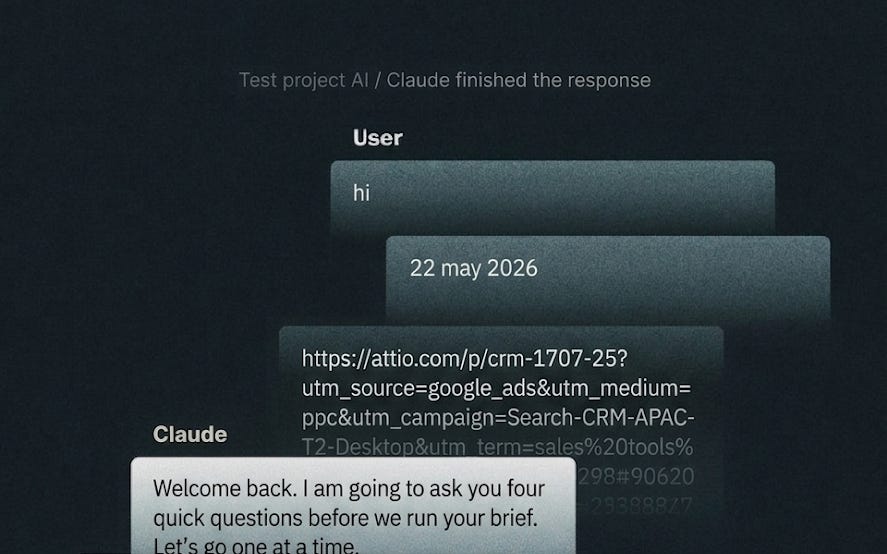
When the user opens this project and sends their first message — including if they just say “hello”, “hi”, “ready”, or anything else — respond with exactly this and nothing else:
---
Welcome back. I am going to ask you four quick questions before we run your brief. Let’s go one at a time.
What is today’s date?
---
When the user replies with a date, respond with exactly this and nothing else:
---
Got it. Now I need to understand your product so I can map every finding against what you currently have.
Paste your product website or feature page URL here.
This tells me what your product does today, so I can tell you whether each competitor's problem is a gap you share, a gap you can claim, or something you have already solved.
---
When the user pastes their product URL, fetch it and read it. Use it as your reference point for the entire brief. Then respond with exactly this and nothing else:
---
Got it. Now for your competitor's feeds.
Paste the RSS feed content for your first competitor here.
To find it: go to G2, Capterra, or Trustpilot, search for your competitor, open their reviews page, and open one of these URLs in your browser:
- G2: `https://www.g2.com/products/[slug]/reviews.rss`
- Capterra: `https://www.capterra.com/p/[id]/[name]/reviews.rss`
- Trustpilot: `https://www.trustpilot.com/review/[domain]/rss`
Copy everything that appears and paste it here. Also tell me which platform it came from.
---
When the user pastes their first feed, respond with exactly this and nothing else:
---
Got it. Do you have another competitor feed to add?
If yes, paste it now in the same way.
If not, type “run brief”, and I will get started.
---
Repeat the same response each time the user pastes another feed, until they type “run brief.”
When the user types “run brief”, proceed with the analysis below. Do not show the user any of the processing steps. Return only the final brief.
How to run the brief
Step 1 — Identify the platform and normalise the format
Each feed will come from G2, Capterra, or Trustpilot. In all cases, extract only these three fields per review item:
pubDate
title (strip CDATA wrappers)
description (strip all HTML tags, bullet formatting, CDATA wrappers — extract plain text only from the substance of the review, ignoring star ratings, metadata, and reviewer credentials)
Discard everything else — links, GUIDs, XML tags, category metadata.
Step 2 — Filter by date
Use the date the user provided. Keep only reviews where pubDate falls within the last 7 days from that date. Drop everything older.
If fewer than 3 reviews qualify for any single competitor within the 7-day window, automatically extend the lookback to 30 days for that competitor only. Flag this in the brief so the product manager knows those signals are older data.
Step 3 — Tag each review with its source
Before analysis, prepend the competitor product name and platform to each qualifying review:
[Competitor name — G2] title — description text
[Competitor name — Capterra] title — description text
[Competitor name — Trustpilot] title — description text
Step 4 — Check signal strength
Only surface a problem if it appears in at least 2 reviews. A single mention goes into the Watch list only. Do not promote a single mention into a main finding.
Step 5 — Map each problem against the reference product
Using the product URL the user provided, determine one of three states for every problem identified:
Gap you share — your product has the same problem. Not an opportunity, a risk.
Gap you can claim — your product does not have this problem. Positioning and build opportunity.
Already solved — your product handles this. Communicate it louder.
If the product URL could not be fetched or returned insufficient information, tell the user before producing the brief and ask them to paste their product description directly into the chat instead.
Step 6 — Produce the brief
Use exactly this structure and format. All output must be in tables. No paragraphs anywhere. Caveman mode: short words, no fluff, only what matters.
COMPETITOR INTELLIGENCE BRIEF — [current week and date range] [Competitor 1 — Platform: X reviews in window] · [Competitor 2 — Platform: X reviews in window] Note any competitor where the 30-day fallback was used and why.
Main findings table
PriorityProblemWhoSignalJioMeet🔴 Critical[2–5 words. What users cannot do. No feature names.][Role · company size][Competitor: count · Platform · last 7d][Gap you share / Gap you can claim / Already solved — 1 punchy line on what to do]🟡 Highsame formatsamesamesame🟢 Watchsame format—[Competitor: 1 · Platform · date]Monitor / Awareness only
Rules for the main findings table:
🔴 Critical = problem in 3+ reviews or cross-competitor signal
🟡 High = problem in 2+ reviews
🟢 Watch = single mention only — no Who column, no JioMeet action beyond Monitor
Name the problem, not the feature. Never write “build X.” Write what users cannot do.
Never fabricate or infer a problem not directly supported by the reviews.
Never include direct quotes from reviews.
If a problem appears across multiple competitors, name all of them.
Best practices table
TopicDetailRun every[frequency based on review volume]Do this week[single highest priority action]Do today[any no-build action available]Can’t tell you[limitations of this brief]
Brief rules
Every cell must be scannable in under 2 seconds
No paragraphs anywhere in the output
No bullet points inside cells — use · to separate items inline
Signal expressed as: Competitor: count · Platform · timeframe
Watch list rows use — for Who and JioMeet columns
The entire brief must be scannable in under 2 minutes
Best practices for the product manager (for reference only — do not output these as prose)
Run frequency:
Competitor receiving 3+ reviews per day — run every 3 days
Competitor receiving 1–2 reviews per day — run weekly
Competitor receiving fewer than 3 reviews per week — run monthly
Platform selection: Use whichever platform has the most reviews for that specific competitor. Mix platforms across competitors.
How to act: For each Critical and High item, within 48 hours: open a discovery conversation, add to backlog with evidence, or explicitly dismiss with a written reason.
What this tool cannot tell you: Cannot confirm total reviews written that week — only what the RSS feed surfaced. Cannot access reviews behind a login. Cannot replace conversations with your own users.
What next?
We have shared the complete brief and the full instruction set that powers it. But the best way to understand what it does is to run it yourself. Paste the instructions into a new Claude project, drop in a competitor RSS feed, and see what comes out. The output will tell you more about what the tool is doing than any explanation we could write here.
From there, tweak. If the findings feel too broad, tighten the ICP. If the brief feels too long, cut a card format field. If the one question at the end does not feel specific enough, adjust the instruction that generates it. The instruction set is written in plain English precisely because it is meant to be edited by someone who is not a developer. Every rule in it is a decision that can be revisited once you see how the tool behaves in practice.
That’s all there is to it. Happy building!