



I write two newsletters a week. Each one starts with three things: finding a topic worth writing about, verifying the numbers everyone quotes without checking, and cross-checking sources that often disagree with one another.
Every step of the process requires extensive research (and, by extension, me), from finding enough sources to identify a good topic to identifying all the POVs for that topic.
So I ran an experiment. I made Claude check its own research before handing it to me for a day. Here’s what happened.

It’s one thing to follow a tutorial. But building a product with real users is a totally different beast. We’re launching a cohort where you go from idea to working prototype to real users in four days. No coding experience needed. Cohort begins 29th August.
But first, why does Claude suck at research?
Here's what Claude does when you give it a research question. It searches, finds something that looks like an answer, and stops. Why? Because it doesn’t know how much to dig yet. A single round of searching is never really the answer after all.
What the loop actually does.
Anthropic calls this the evaluator-optimiser workflow. The workflow itself has one simple task: it asks one question after every round: is this answer complete, or are there gaps that need another search? If gaps exist, the generator searches again. If the answer is complete, the loop exits.
So, what does it solve?
Broad multi-angle questions like "What's actually happening in the Indian D2C funding space right now?" Think about it: the same topic has ten relevant angles—funding data, founder perspectives, market comparisons, and contradictory signals. One search round picks up two or three. The loop continues until the evaluator deems the picture complete enough.
Product: “What are users actually complaining about in competitor reviews?” One search round returns the top three complaints. The loop keeps going until it’s covered pricing, onboarding, support, and churn — the full picture.
Marketing: “What’s the current state of influencer marketing ROI in India?” One round returns a headline number. The loop keeps going until it has the methodology behind it, the contradicting studies, and the segment breakdown.
Sales: “What do I need to know about this prospect before the call?” One round returns their homepage and a recent press release. The loop keeps going until it has funding history, recent leadership changes, and what their customers are saying.
People: “What are companies our size doing on hybrid work policy right now?” One round returns two think pieces. The loop keeps going until it has data, edge cases, and what’s actually changed in the last six months.
You get the drift.
What is a loop actually made of?
At its core, a loop is four lines of logic. Generate a response. Evaluate it. If it passes, stop. If it doesn’t, send the feedback back to the generator and go again.
while True:
response = generator(task, feedback)
evaluation = evaluator(response)
if evaluation == “PASS”:
break
feedback = evaluation
That’s it. The generator doesn’t know how many rounds it’ll run. The evaluator doesn’t care. The code is what closes the loop. It reads the evaluator’s verdict and decides: done or go again.
Where to run loops?
A loop needs something that can execute code — somewhere that reads the evaluator’s verdict, makes the PASS or FAIL decision, and triggers the next round automatically. Three places work.
Claude Code: Anthropic’s own coding environment. You describe the loop in plain language, and Claude writes and runs the code for you. No setup beyond having Claude Code open. The tradeoff: it runs on credits, not free.
Google Colab: a free, browser-based Python notebook. No installation, no local setup, runs entirely in your browser. This is where most BAI builds live and what we’ll use today.
GitHub Codespaces: a cloud development environment that runs directly from a GitHub repo. Free tier available, but limited to a certain number of hours per month. Better for teams sharing a codebase than for a solo build.
For someone like me who runs this once or twice a week for newsletter research, Colab is the right call since it’s free and browser-based.
What we’re building today.
A raw Colab notebook works, but you won’t use it twice. You’d have to open it, find the cell, paste your question into the code, run it, and scroll through the output. Too much friction for something you want to run every week.
Streamlit wraps the same code in a text box, a run button, and a live output. Makes code more like something you’d actually use.
Tavily handles the searching. Returns clean, structured results in a single call, works with any model, and gives you 1,000 free searches a month. No credit card.
Groq runs the two prompts. Free tier, fast enough that waiting between rounds doesn’t break the flow. Model: llama-3.3-70b-versatile.
The generator prompt is the researcher. Takes your question, searches via Tavily, produces an answer with explicit instructions on source quality. The loop doesn’t fix bad sources. The prompt does.
The evaluator prompt is the completeness checker. Reads the answer and returns one verdict: PASS if complete, FAIL with specific gaps if not. That structured output is what the code reads to decide whether to go again.
The while loop is what makes it actually a loop. Runs the generator, passes output to the evaluator, reads the verdict, stops or sends gaps back. Without the code, you just have two prompts.
The build.
Step 1: Get your API keys.
You'll need two API keys before you start. Grab your Groq key from console.groq.com and your Tavily key from app.tavily.com
Keep both open in a tab. You'll need them in the next step.
Step 2: Create a GitHub repo
Go to github.com → click the + icon top right → New repository. Name it research-loop. Set it to Public. Click Create repository.
You’ll land on an empty repo. Click Add file → Create new file. Name the file requirements.txt. Paste this inside:
groq
tavily-python
streamlit
Commit the file. Then create a second file — research_loop.py. Paste the full code.
import os
import re
import streamlit as st
from groq import Groq
from tavily import TavilyClient
# --- Clients ---
groq_client = Groq(api_key=os.environ.get(”GROQ_API_KEY”))
tavily_client = TavilyClient(api_key=os.environ.get(”TAVILY_API_KEY”))
MODEL = “openai/gpt-oss-120b”
MAX_ROUNDS = 4
# --- Search ---
def search(query: str) -> str:
results = tavily_client.search(
query=query,
search_depth=”advanced”,
max_results=5,
include_raw_content=False
)
formatted = []
for r in results.get(”results”, []):
formatted.append(f”Source: {r[’url’]}\nTitle: {r[’title’]}\nContent: {r[’content’]}\n”)
return “\n”.join(formatted)
# --- Generator ---
def generator(question: str, feedback: str = “”) -> tuple[str, str]:
search_query = question
if feedback:
search_query = f”{question} {feedback}”
search_results = search(search_query)
feedback_section = f”\n\nPrevious evaluation feedback — address these gaps specifically:\n{feedback}” if feedback else “”
prompt = f”“”You are a research assistant producing answers for a professional Indian business newsletter.
Your job: answer the research question below using the search results provided.
SOURCE RULES — these are strict and non-negotiable:
- PREFER, in this order: (1) company filings, annual reports, investor presentations, earnings releases; (2) named business publications with a bylined journalist (Business Standard, Economic Times, Mint, Reuters, Bloomberg); (3) government or regulatory data.
- NEVER cite: LinkedIn posts, Medium posts, personal blogs, PESTEL/SWOT analysis sites, listicles, SEO content farms, HBR case-study summaries republished by third parties, or any page that doesn’t name a specific author or institution.
- If a claim can only be supported by an excluded source, DROP the claim rather than cite a weak source.
- For every claim, prefer a specific number from a primary source over a general statement from a secondary one.
ANSWER RULES:
- Cover all major angles — don’t stop at the first sufficient-looking answer
- Lead with the most recent data available (latest quarter or full year), and name the reporting period
- Name a specific source for every claim, and include a number or data point wherever one exists
- Flag explicitly if two sources contradict each other — never average them into one sentence
- Explain the business implication of each finding, not just the fact
- Write in clear, direct prose{feedback_section}
Research question: {question}
Search results:
{search_results}
Answer:”“”
response = groq_client.chat.completions.create(
model=MODEL,
messages=[{”role”: “user”, “content”: prompt}],
max_completion_tokens=4000,
temperature=0,
reasoning_effort=”low”
)
answer = response.choices[0].message.content or “”
return answer.strip(), search_results
# --- Evaluator ---
def evaluator(question: str, answer: str) -> tuple[str, str]:
prompt = f”“”You are a strict research editor. Your only job is to check whether this answer is complete.
Research question: {question}
Answer to evaluate:
{answer}
Check for these specific gaps:
1. Are there major angles of this question that weren’t covered?
2. Are there claims made without a named source — publication, institution, company filing, or official report?
3. Does any claim rely on a weak source (LinkedIn post, Medium, personal blog, PESTEL/SWOT site, listicle, unnamed author)? If so, that is an automatic FAIL.
4. Is there a specific number or data point for every key claim, or are claims stated as general facts without evidence?
5. Is the answer using the most recent data available, or is it citing older figures when newer ones exist?
6. If two sources disagree, has that contradiction been named explicitly — or was it averaged into one clean sentence?
7. Is there a named company, market, or India-specific context where relevant — or is the answer too generic to be useful for an Indian business audience?
8. Does the answer explain the business or market implication of each finding — not just the fact itself?
9. Would a domain expert read this and immediately ask “but what about X?”
If the answer passes all seven checks, respond with exactly:
VERDICT: PASS
If any check fails, respond with exactly:
VERDICT: FAIL
GAPS:
- [specific gap 1]
- [specific gap 2]
Be strict. If in doubt, FAIL.”“”
response = groq_client.chat.completions.create(
model=MODEL,
messages=[{”role”: “user”, “content”: prompt}],
max_completion_tokens=2000,
temperature=0,
reasoning_effort=”low”
)
evaluation = response.choices[0].message.content or “”
if “VERDICT: PASS” in evaluation:
return “PASS”, “”
else:
gaps_match = re.search(r”GAPS:(.*)”, evaluation, re.DOTALL)
gaps = gaps_match.group(1).strip() if gaps_match else “Gaps not specified”
return “FAIL”, gaps
# --- Loop ---
def research_loop(question: str, status_container, output_container):
feedback = “”
final_answer = “”
for round_num in range(1, MAX_ROUNDS + 1):
status_container.markdown(f”**Round {round_num}** — Searching...”)
answer, sources = generator(question, feedback)
status_container.markdown(f”**Round {round_num}** — Evaluating completeness...”)
verdict, gaps = evaluator(question, answer)
if verdict == “PASS”:
status_container.markdown(f”**Round {round_num}** — ✅ Complete”)
final_answer = answer
break
else:
status_container.markdown(f”**Round {round_num}** — ❌ Gaps found:\n{gaps}”)
feedback = gaps
final_answer = answer
if round_num == MAX_ROUNDS:
status_container.markdown(f”**Round {round_num}** — ⚠️ Max rounds reached. Returning best answer.”)
output_container.markdown(”### Research Complete”)
output_container.markdown(final_answer)
# --- Streamlit UI ---
st.set_page_config(page_title=”Research Loop”, page_icon=”🔍”, layout=”wide”)
st.title(”🔍 Research Loop”)
st.markdown(”Ask a broad research question. The loop keeps searching until the answer is complete.”)
question = st.text_area(
“Your research question”,
placeholder=”e.g. What’s actually happening in the Indian D2C funding space right now?”,
height=100
)
if st.button(”Run Research Loop”, type=”primary”):
if not question.strip():
st.error(”Please enter a research question.”)
else:
st.markdown(”---”)
st.markdown(”**Loop Progress**”)
status_container = st.empty()
st.markdown(”---”)
output_container = st.container()
with st.spinner(”Running research loop...”):
research_loop(question, status_container, output_container)
Commit this too.
Wait, what does that huge block of code do?
Setup: connects to Groq and Tavily using your API keys. Sets the model and the max number of rounds before the loop stops.
Search: goes to the web via Tavily, pulls 5 results, formats them for the model to read.
Generator: the researcher. Takes your question, searches, writes an answer using only what it found. Source rules live here. If a previous round failed, it gets the gaps and searches again.
Evaluator: the editor. Reads the answer, checks it against 9 criteria, returns PASS or FAIL with specific gaps listed.
Loop + UI: connects everything. Runs generator → evaluator → checks verdict → stops or goes again. The Streamlit section builds the text box and run button.
Your repo now has two files. That’s all Streamlit needs.
Step 3: Deploy on Streamlit.
Go to share.streamlit.io. Sign in with your GitHub account. Click Create app → Deploy a public app from GitHub.
Select your research-loop repo. Set the main file path to research_loop.py. Click Advanced settings before you deploy.
Under Secrets, paste this exactly:
GROQ_API_KEY = “your_groq_key_here”
TAVILY_API_KEY = “your_tavily_key_here”
Replace the placeholder text with your actual keys. Click Save, then Deploy.
Streamlit will build the app (it takes about 60 seconds). When it’s done, you’ll get a public URL. Click it. Your text box and run button will be there.
Step 4: Test it out.
Type a broad research question into the text box.
Good: What is ITC doing in FMCG strategically?
Too narrow: What was ITC’s revenue in FY26?
Hit Run Research Loop. You’ll see the rounds happen in real time — what the evaluator found missing each round, and when it finally passed or hit the max round cap.
The answer that comes back will have named sources for every claim. If two sources disagree, it’ll say so explicitly instead of averaging them into one clean sentence. If a claim couldn’t be supported by a primary source, it was dropped rather than cited weakly.
That’s the loop working.
Result?
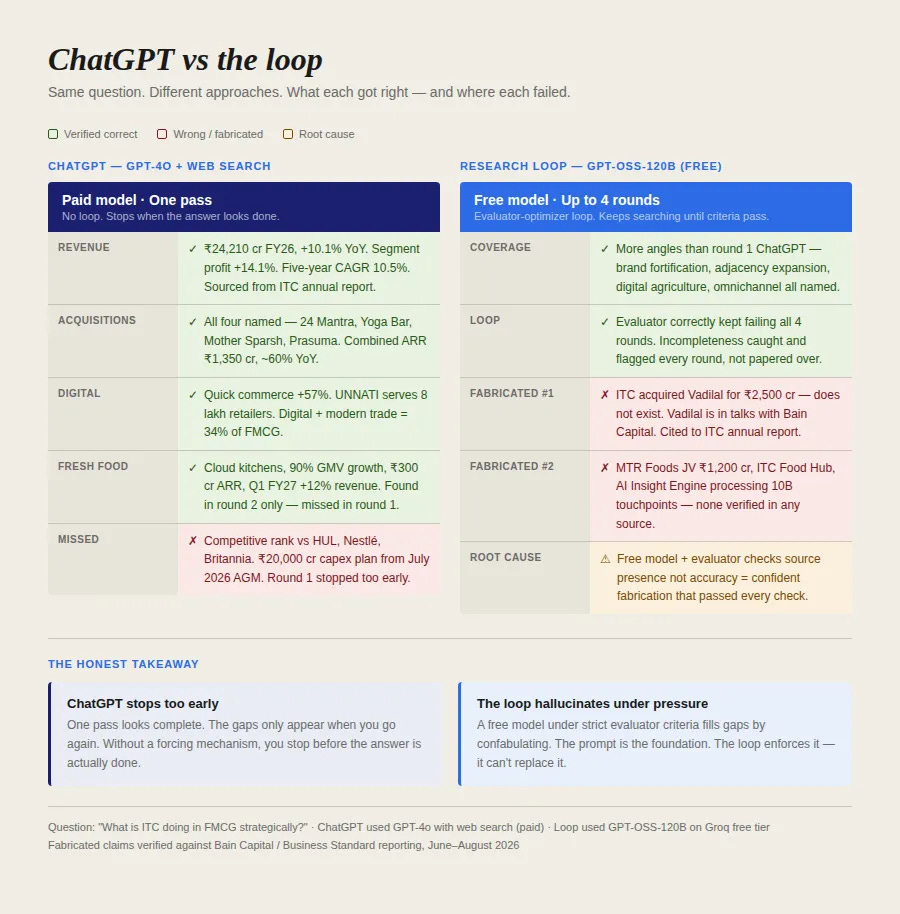
Here’s what the experiment actually taught me: a loop is not a fix. It’s a structure. What goes into it determines what comes out.
To make a loop work, you need three things: a model capable enough to act on feedback, a generator prompt strict enough that the model knows what good looks like, and evaluation criteria precise enough that PASS actually means something. Get any one wrong, and the loop enforces the wrong thing: reliably, across every round.
None of that is knowable upfront. You find out by running it, seeing where it breaks, and fixing what broke.
Before you go.
Getting good at AI isn’t a solo sport.
The people who get good fast do it inside a community with live feedback from people who’ve already solved the problem you’re stuck on. GrowthX gives you that, plus AI credits from top companies and weekly AI sessions.
Want to plug your brand into our newsletter?
Email us at collab@growthx.club

I ran a similar test last month, splitting research across Claude and Perplexity to see which one caught more contradictions between sources. Claude was better at synthesizing a coherent POV, but Perplexity surfaced more disagreeing sources in the first place, which matters more for the cross-checking step you described. Curious if you tried a second model as a sanity check on the first one's output.