



3 weeks ago, my manager told me to start testing the plugs I add to our newsletters every week.
So I did. Tried a new variant every week, logged them in a sheet. That lasted a week. Eventually, I kept forgetting to update the sheet.
So, I built a system to automate it.

Build Week starts this weekend.
The first two days, you'll build your product live, with us helping you get unstuck in real time. The next five evenings (two hours after work) to polish it, get it in front of real users, and learn to sell what you built. Saturday, you ship.
The cohort is hosted and taught by Udayan Walvekar, Co-founder & CEO of GrowthX.
Introductory price: ₹20,000. Join now to get ChatGPT/Codex Pro (worth ₹10,699) through our OpenAI collaboration for Build Week.
Enrolment closes tomorrow, Friday, at 8 PM.
Decision 1: Where to capture.
Here’s what was actually happening when I was writing plugs. When I’d sit down to write a new plug, I’d naturally open the previous edition, check how many clicks the last one got, consider why it worked, decide what needed to change, and run a new experiment.
The problem was logging.
Opening a new tab, finding the sheet, going back to check the actual click numbers, finding the plug image, and pasting it in was simply too much work. A good 15 minutes spent just to log something I already did.
The solution.
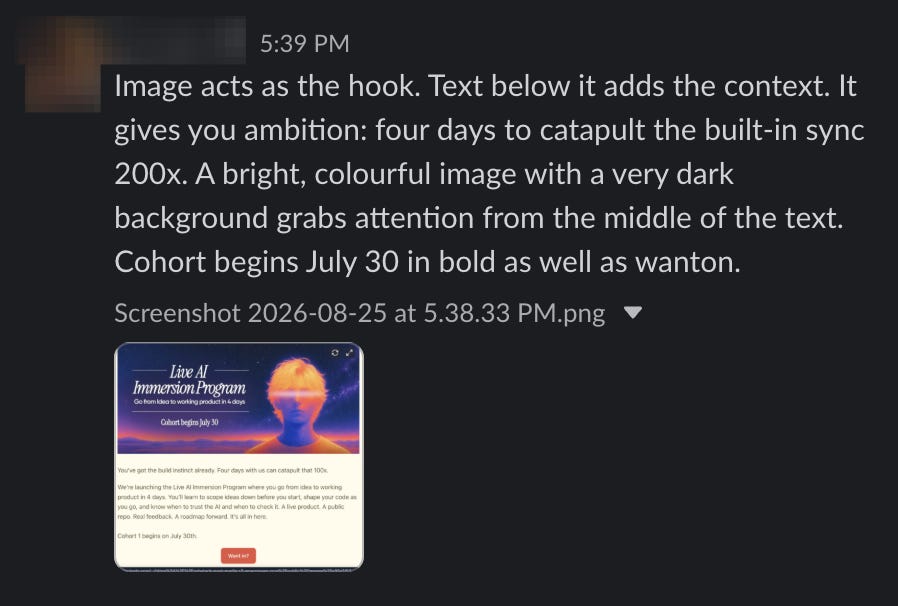
See, I was logged in and on the company Slack all the time. So, instead of a separate logging session, every action is logged as it becomes relevant. I'm writing a new plug — I take a screenshot and add one line about what I changed. The one line matters because a screenshot tells the system what the plug looks like, not why I made it that way. Later, when the clicks come in, I post a one-line update in the same channel. No separate task to remember.
Why I didn’t just start a new Claude chat.
Claude doesn’t remember between sessions — every conversation starts fresh. So “just tell Claude” works once for one plug. The moment you want to compare what you tried two weeks ago, it’s gone. The data needs to live somewhere that doesn’t reset every time you close a tab. That’s why Slack feeds into a database, not into a chat.
So now I'm posting a screenshot of the plug, plus one line about what I changed. The screenshot alone isn’t enough — it tells the system what the plug looks like, not why I made it that way. The one line is what turns “here’s an image” into “here’s what I was testing.” And when the clicks come in later, I post a one-line update in the same channel.
Decision 2: AI vs Code. Who should do what.
Once the message lands in Slack, two things need to happen. The image needs to be stored in a structured format, and someone needs to make sense of what’s in it. Those are different jobs.
Code handles the first part.
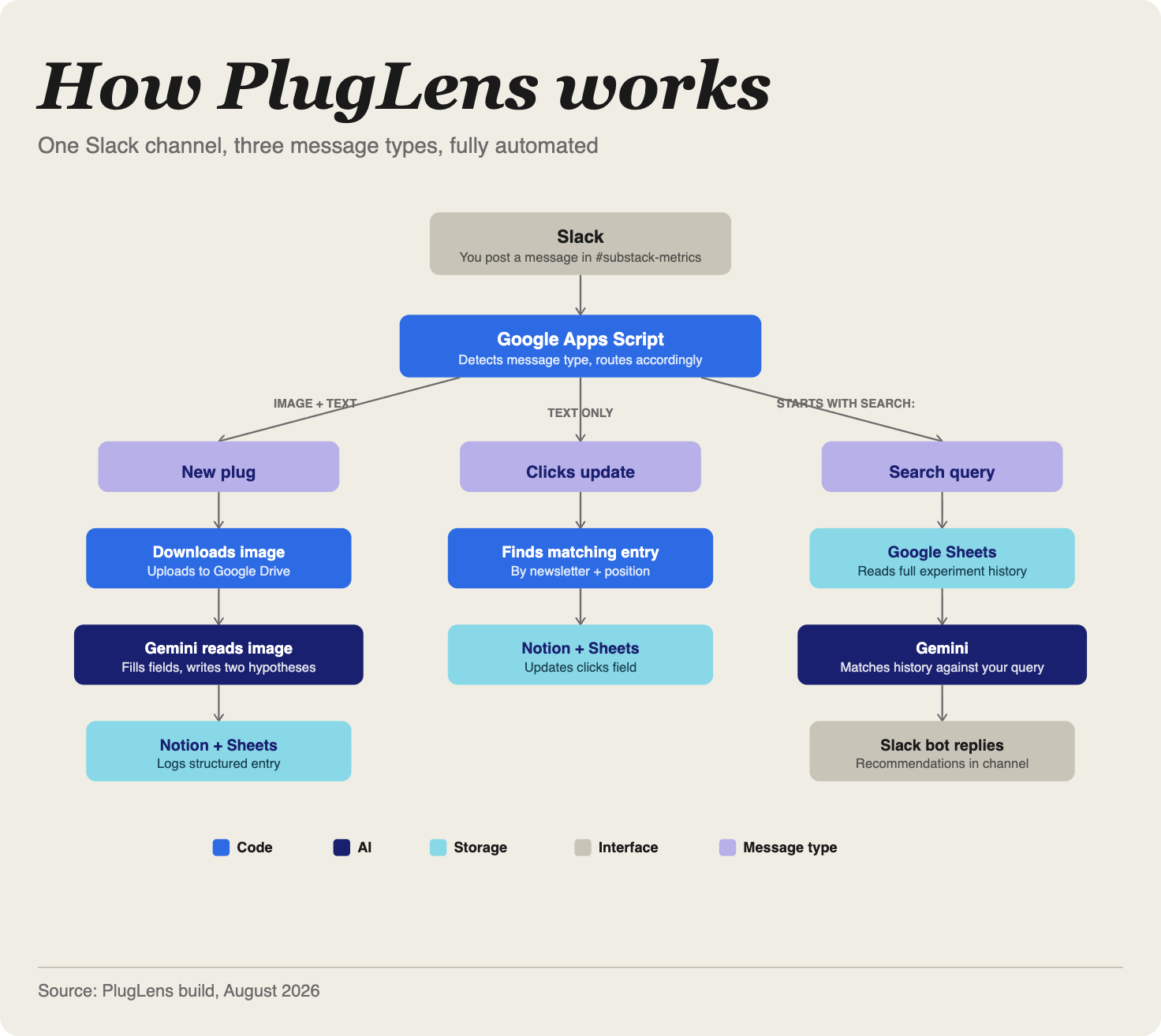
It pulls the image from Slack, uploads it to Google Drive, figures out whether this message is a new plug, a clicks update, or a search query, and routes it accordingly. There’s no judgement involved — it’s pattern matching and file moving. Code is reliable at this. AI would be overkill.
Then Gemini gets the image.
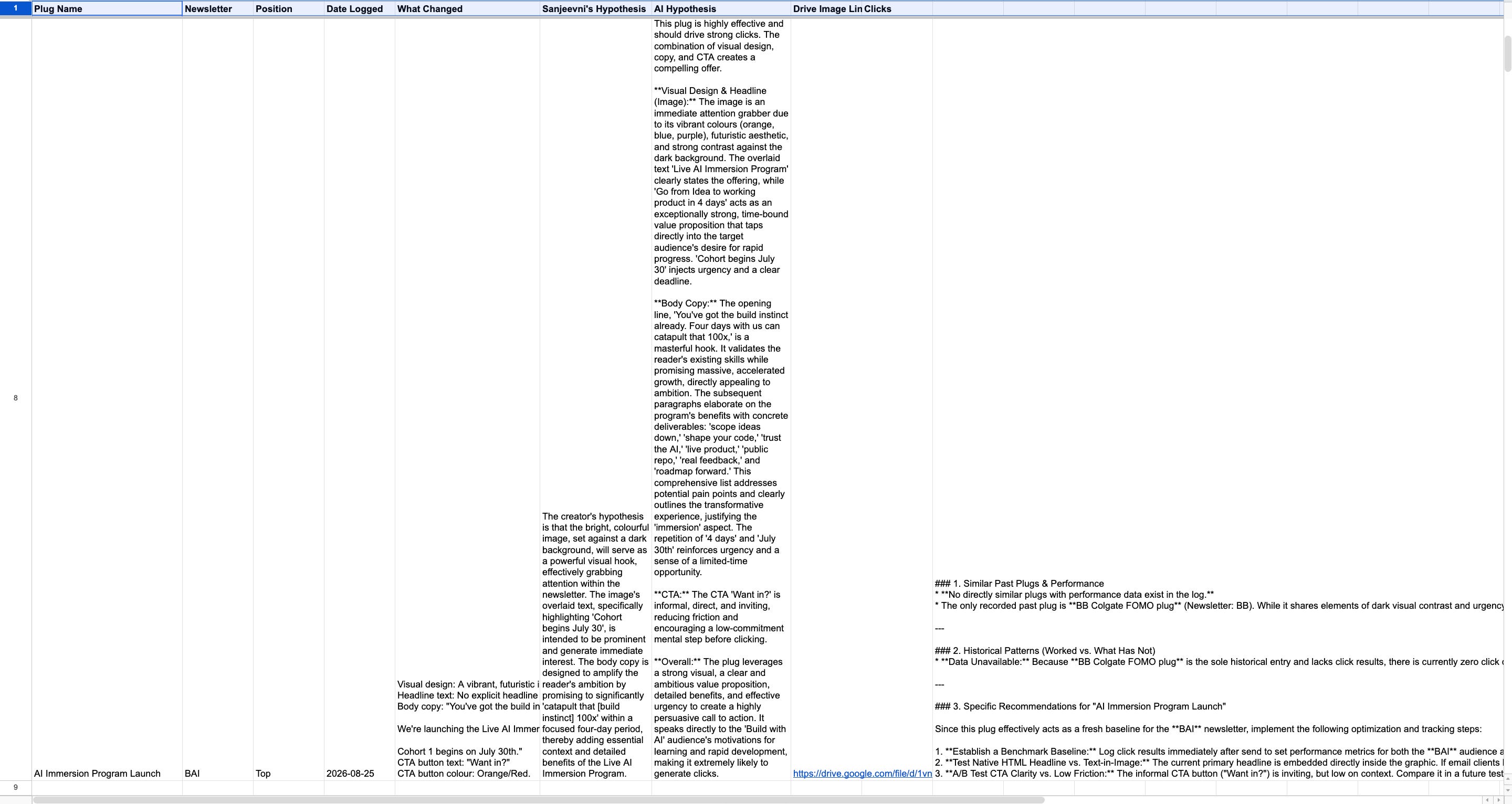
It doesn’t just describe what it sees. It reads every word on the plug, including the headline, body copy, and CTA text, checks the button colour to figure out which newsletter it’s for, decides whether it’s a sponsor plug or one of ours, and then writes two hypotheses.
One is mine, pulled from my one-liner and written up properly. The other is its own — a professional take on why this specific combination of visual, copy, and CTA should or shouldn’t drive clicks.
Do we really need AI here?
While I’m writing a one-line entry because I’m short on time, I might miss insights that are genuinely valuable. So, AI takes it up. It acts as a professional ad plug writer and does the complete analysis for me. And at 0 extra cost, effectively.
Then, the indexing.
All of this information, the details of the plug itself, my hypothesis and AI’s hypothesis needs to go into a database.
Why? So that the information is searchable by both humans and AI. Meaning I can show my manager how each plug worked during my performance review, plus use AI to optimise my plugs.
Decision 3: Making the system smarter.
Up to this point, the system is a logger. A good one: AI does the interpretation, code does the moving, I do the capturing. But it’s still one entry at a time. Each plug is analysed in isolation, with no awareness of what came before it.
That’s fine for week two. By week ten, I’d have forty entries and the same problem I started with — a growing pile of data I’d have to dig through manually to find anything useful.
So, what happens when I want to write a new plug combining elements from 3 previous plugs?
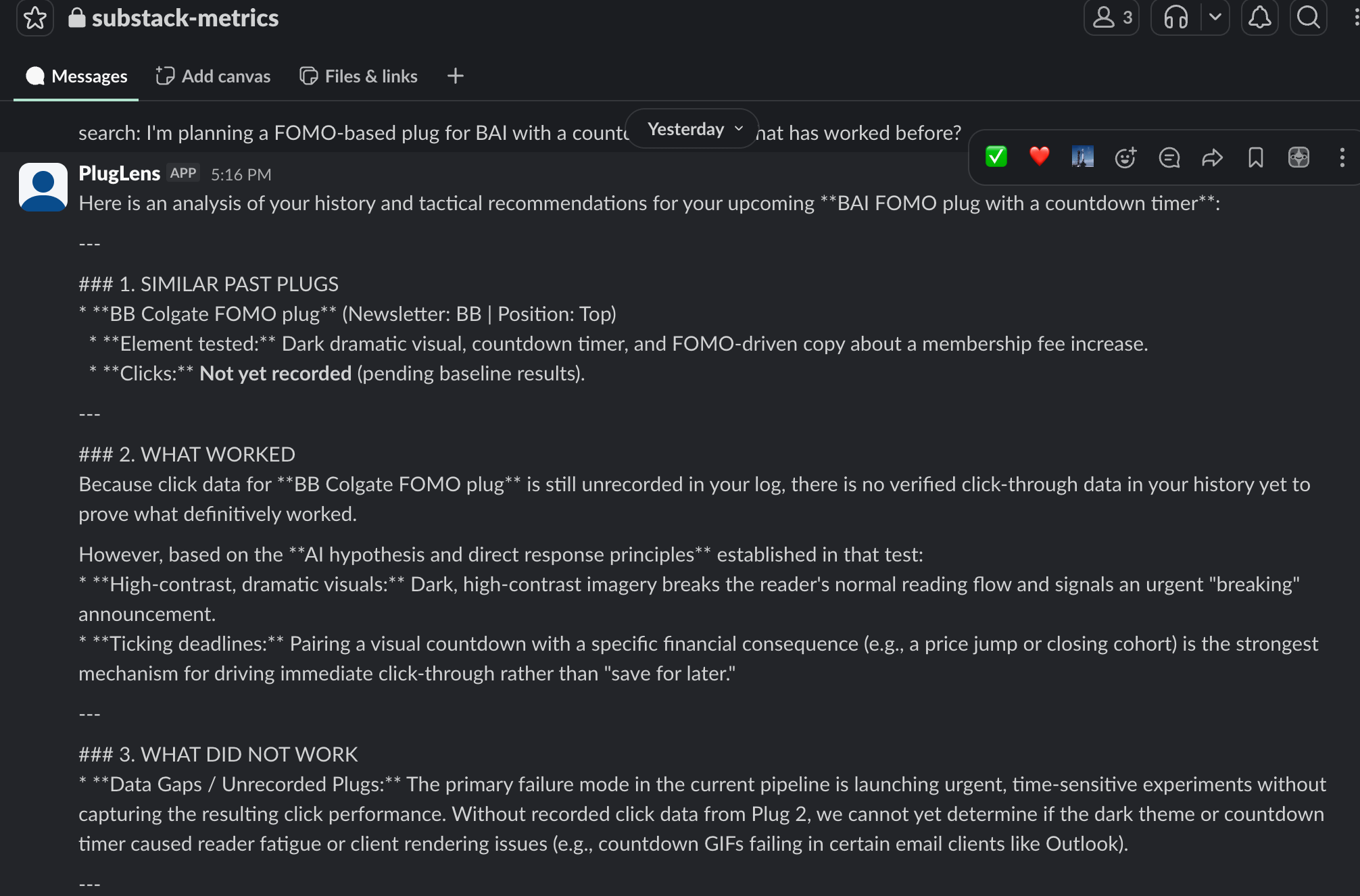
The system reads every past entry from Sheets, sends the full history to Gemini along with my question, and replies in Slack with which past plugs were similar, what the click data said about them, which patterns held up, and what it would specifically recommend for the plug I'm planning.
The structured logging from Sections 2 and 3 is what makes this work. If each entry had different fields, or the data lived in a chat thread instead of a database, Gemini couldn't read across it. The schema is what makes the history queryable.
What broke? And how did I fix it?
Built this over two days, and almost everything I tried kept failing.
Pipedream was the first platform I tried to use to automate the system.
Here, you connect your accounts — Slack, Google Drive, Notion — and it passes the auth tokens into your code. Except it didn’t. The tokens appeared connected in the UI but returned as undefined when the code ran. Hours of debugging a problem that turned out to be the platform, not anything I wrote.
So I tried n8n. Clean interface, visual workflow builder, looked like exactly what I needed. Then I saw the pricing page. No free tier. The cheapest plan is 24 euros a month. For a personal automation running four times a week, that’s not happening.
Google Apps Script ended up being the thing that worked.
If you haven’t used it — it’s Google’s built-in scripting tool. Free, runs on their servers permanently, and has native access to Drive, Sheets, and Gmail without needing to set up any external connections. It’s not flashy, but it doesn’t go down, and it doesn’t charge you.
Then, Gemini deprecated a model halfway through the build.
The one I started with — gemini-2.0-flash — stopped accepting requests and told me to use gemini-3.6-flash instead. The replacement worked, except when it was overloaded—it returned 503 errors under high demand.
So I built a fallback chain: the system tries 3.6-flash first, then 2.5-flash, then 2.0-flash-lite. If one model is down, it moves to the next. When you’re building on a free-tier API you don’t control, that kind of resilience isn’t optional. It’s the difference between a tool that works on demo day and one that works on a Tuesday afternoon when Google’s servers are under load.
And then there was debugging itself.
Apps Script’s built-in logging was greyed out because no Google Cloud project was linked to the script. So I couldn’t see what was happening when the webhook fired — the system would run, something would break, and I’d have no idea where.
The fix was building a debug sheet. I wrote a function that logs every step to a separate Google Sheet: “Step 1 done. Step 2 done. Gemini returned this. Notion returned that.” When something breaks now, I open the sheet and see exactly where it stopped. It’s the crudest part of the whole build and the most useful.
My learnings on how to build products.
I kept coming back to three questions while building this:
Where am I already doing this manually — and where in that existing behaviour is the lowest-friction place to capture information?
What should AI actually do here versus what should code handle?
AI is good at reading, interpreting, and comparing. Code is good at moving, routing, and storing. Mixing those up is how you end up with something fragile and expensive.What would make this system more useful in three months than it is today?
That’s the question that turned a logging tool into something I actually go back to before writing every new plug.
Getting good at AI isn’t a solo sport.
The people who get good fast do it inside a community with live feedback from people who’ve already solved the problem you’re stuck on. GrowthX gives you that, plus AI credits from top companies and weekly AI sessions.
Want to plug your brand into our newsletter?
Email us at collab@growthx.club
