



Imagine this. You’re mid-conversation with an AI. Suddenly, the responses get shorter. Sometimes, worse — the AI starts missing things you said three messages ago.
Congrats! You might’ve hit the token limit.
Most people start a new chat and lose context. We did too. That’s why we built a tool that shows you exactly where your tokens are going — and rewrites your system prompt to use fewer of them.
Set a timer for 90 minutes. We’re starting now.
But first, why do token limits get hit?
Every model has a context window. That’s the amount of information it can hold at once. Meaning input, output, system prompt, conversation history, all compete for the same space.
Here’s why.
1. Conversation history. AI re-reads the entire conversation from the top, every single time you send something. So a productive session hits 50,000+ tokens after just 10-15 exchanges.
2. Pasted documents and code. Simple rule: the bigger and more information-dense your document, the bigger your token count. A 50-page contract is roughly 75,000 tokens. A medium-sized codebase, 250,000. All that even before you ask a single question.
3. Context rot. Models start degrading at 60-70% of their stated window — responses get vaguer, instructions get missed. This is why your AI sounds dumber even when you have memory left.
4. Your system prompt. If it’s 800 tokens of loosely written instructions, that’s 800 tokens spent before you’ve typed a word.
Today, we’re building a tool to solve the last one.
What does the tool do?
It asks you to enter your prompt, tells you the number of tokens it’ll use, and suggests a more token-efficient prompt for you. We’ll build this entire setup using Streamlit, GitHub and Groq. If you’ve read our last edition, you’d recognise that we’d used the same system to build the pitch detector out. But if you’re new here, here’s the rundown of what each tool does.
- Streamlit: Helps us host the webpage
- Groq: This is the AI layer that actually compresses the prompt
- GitHub: This is where our code lives.
- tiktoken: OpenAI’s free library for counting tokens. Runs entirely on your machine. No API key needed.
Step 1: Create a GitHub repo.
1. Go to github.com. Sign in.
2. Click the + icon in the top right corner. Select New repository.
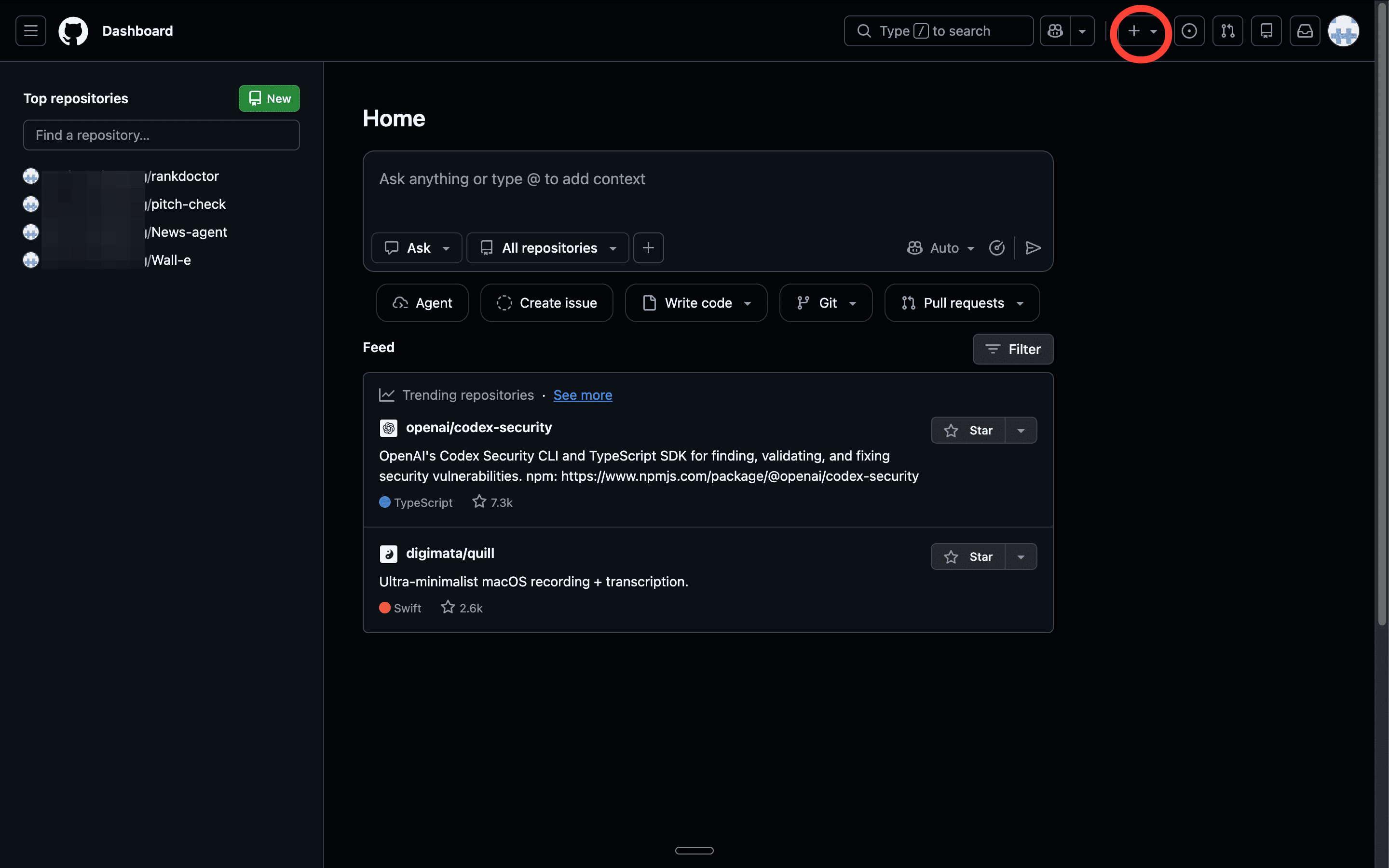
3. Fill in:
Repository name: token-counter
Description: skip it
Set it to Public
Check Add a README file
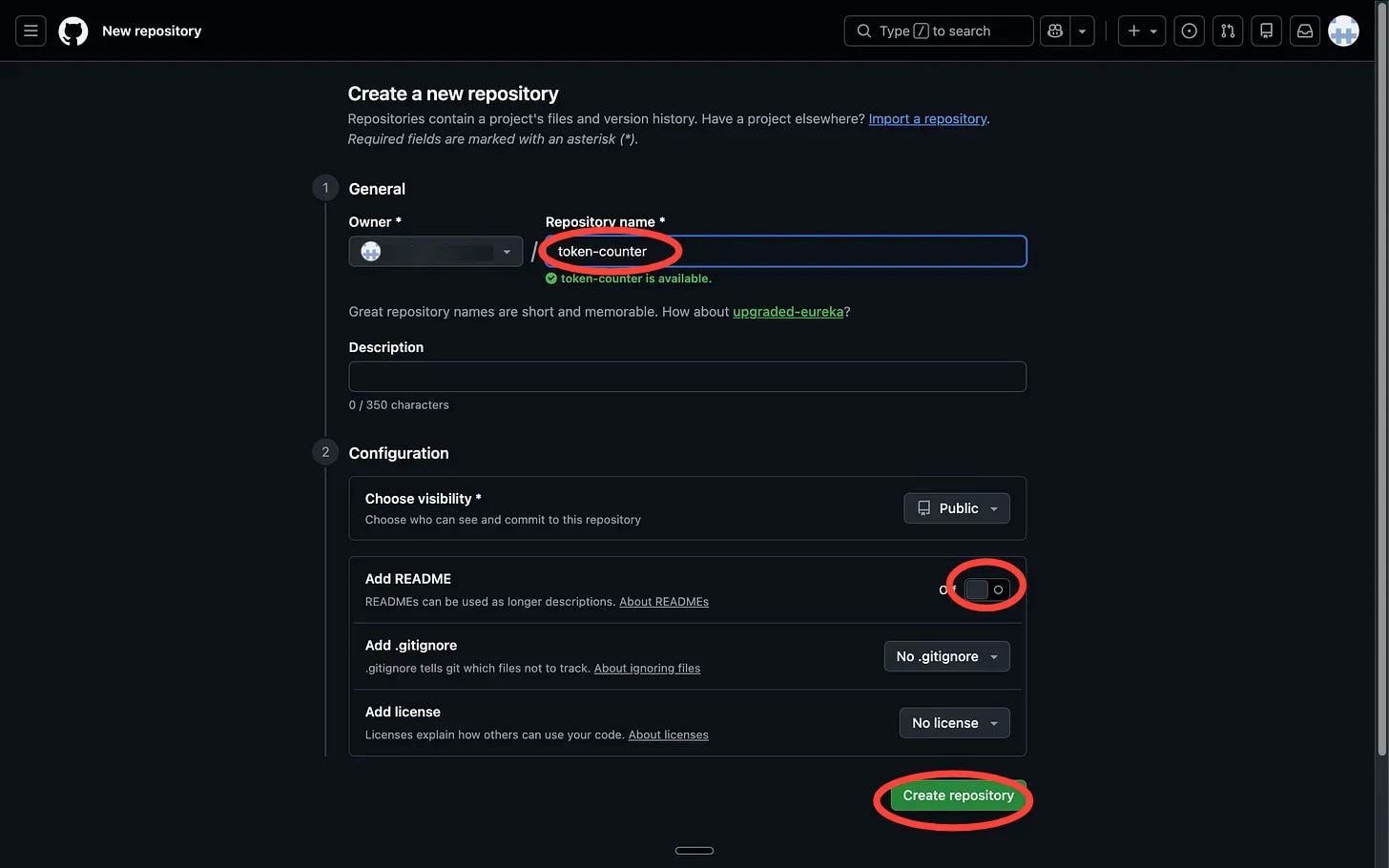
4. Click Create repository.
Step 2: Create the requirements file.
This tells Streamlit which libraries to install when it deploys your app.
In your repo, click Add file → Create new file.
Name it exactly:
requirements.txt
Paste this as the content:
streamlit
tiktoken
groq
Scroll down and click Commit changes.
Committing is GitHub's way of saving. Think of it as hitting save, but with a record of every change you've ever made.
Leave everything as default and hit Commit changes again.
Step 3: Get your Groq API key.
1. Go to console.groq.com. Sign in or create a free account. No credit card needed, and the free tier doesn’t expire.
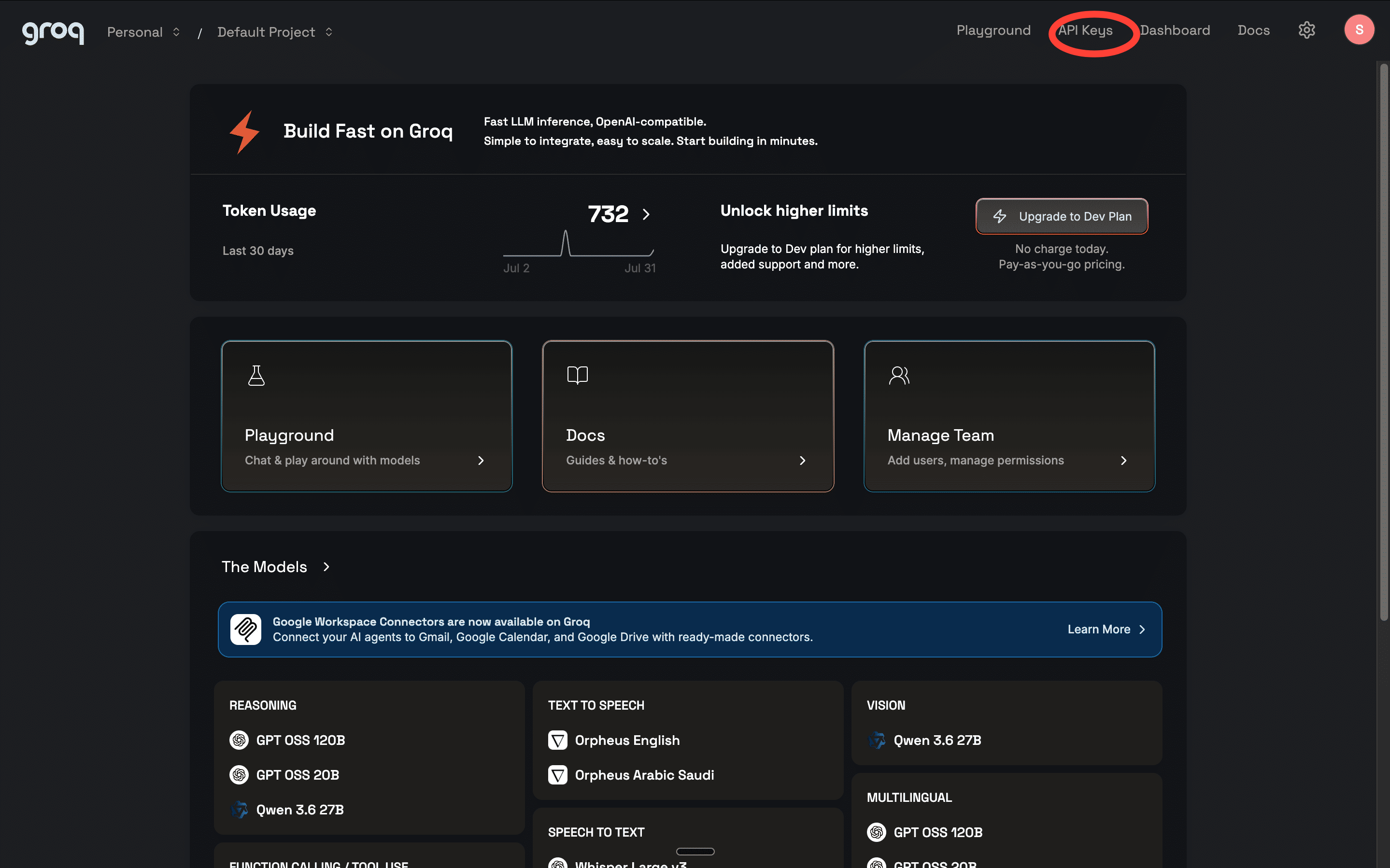
Once you’re in, click API Keys.
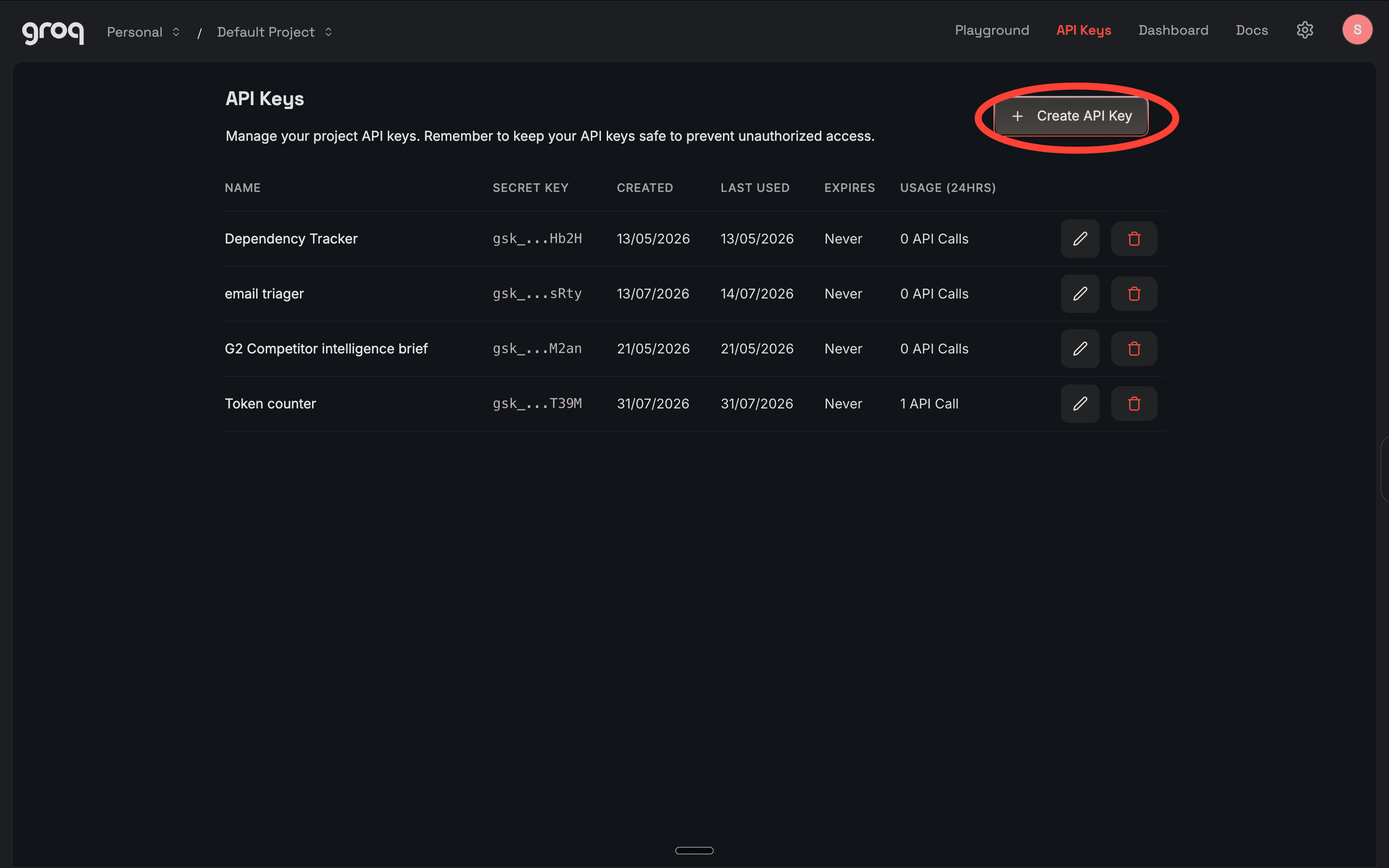
Hit Create API Key. Name it anything; even “token-counter” works. Copy the key. It starts with gsk_.
Keep this tab open.
Step 4: Create the app file on GitHub.
This is the file that actually runs your tool. It has to be named app.py. Streamlit looks for this exact name when it deploys.
What it does: takes your inputs, counts the tokens using tiktoken, sends your system prompt to Groq, and returns a compressed version with a before/after count.
So, head to your HitHub repo.
1. Click Add file → Create new file.
2. Name it app.py
3. Paste this code exactly.
import streamlit as st
import tiktoken
import os
from groq import Groq
st.title(”Token Counter + Prompt Compressor”)
system_prompt = st.text_area(”System prompt”, height=150)
conversation_history = st.text_area(”Conversation history”, height=100)
new_message = st.text_area(”New message”, height=80)
if st.button(”Count + Compress”):
api_key = st.secrets[”GROQ_API_KEY”]
encoder = tiktoken.get_encoding(”cl100k_base”)
system_tokens = len(encoder.encode(system_prompt))
history_tokens = len(encoder.encode(conversation_history))
message_tokens = len(encoder.encode(new_message))
total_tokens = system_tokens + history_tokens + message_tokens
st.subheader(”Token breakdown”)
st.write(f”System prompt: **{system_tokens} tokens**”)
st.write(f”Conversation history: **{history_tokens} tokens**”)
st.write(f”New message: **{message_tokens} tokens**”)
st.write(f”Total: **{total_tokens} tokens** ({round((total_tokens / 131072) * 100, 1)}% of limit)”)
st.subheader(”Compressed system prompt”)
client = Groq(api_key=api_key)
response = client.chat.completions.create(
model=”llama-3.3-70b-versatile”,
messages=[
{”role”: “system”, “content”: “You are an expert at making AI system prompts shorter without losing meaning. Remove filler, redundancy, and over-explanation. Keep all instructions intact.”},
{”role”: “user”, “content”: f”Compress this system prompt:\n\n{system_prompt}”}
]
)
compressed = response.choices[0].message.content
compressed_tokens = len(encoder.encode(compressed))
saved = system_tokens - compressed_tokens
st.text_area(”Compressed version”, value=compressed, height=150)
st.write(f”Before: **{system_tokens} tokens** → After: **{compressed_tokens} tokens** → Saved: **{saved} tokens**”)
4. Commit the file.
Step 5: Deploy on Streamlit.
Your code is on GitHub, but it’s not running anywhere yet. Streamlit reads your repo and turns it into a live app.
1. Go to share.streamlit.io. Sign in with your GitHub account.
2. Click Create app.
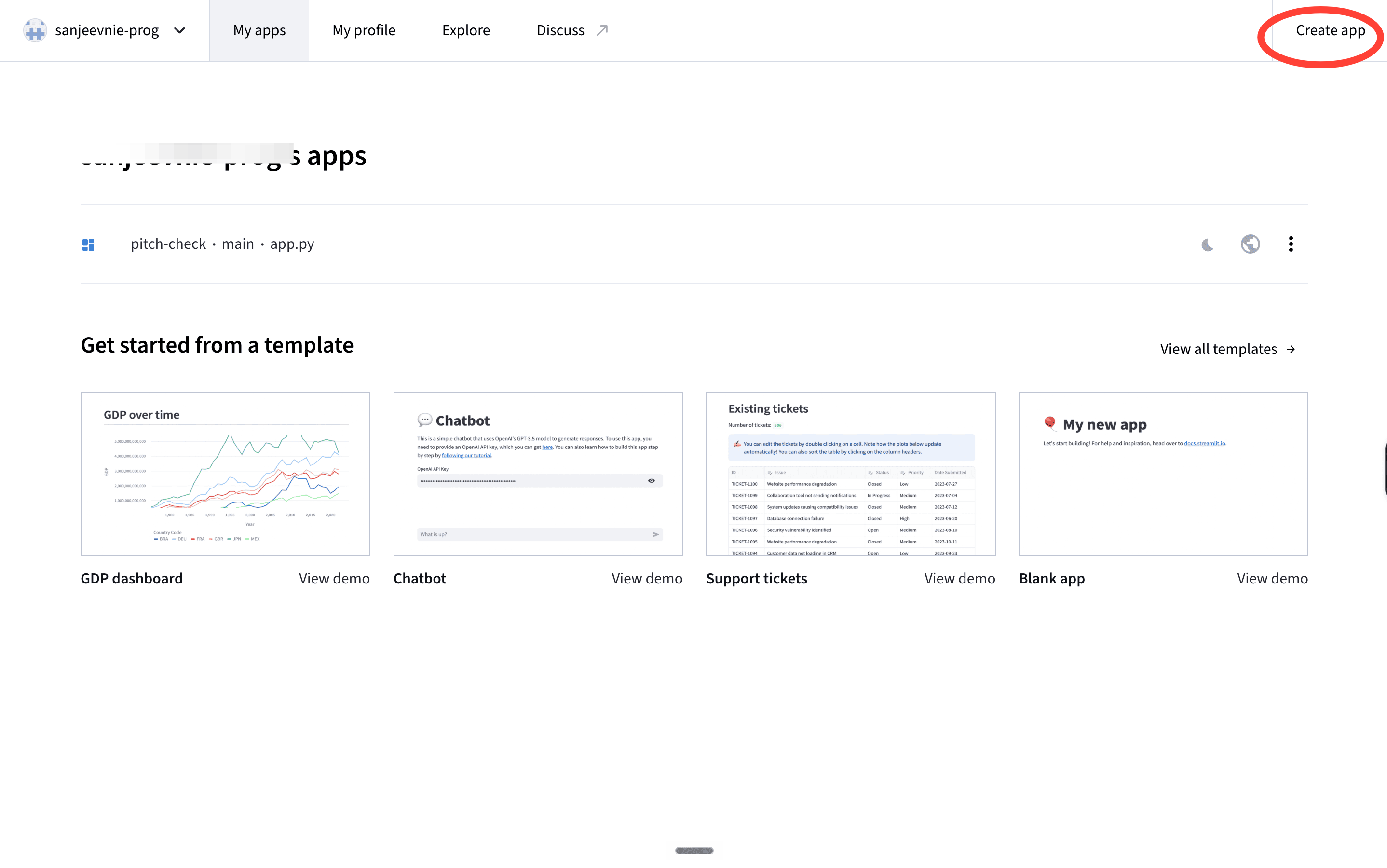
3. You’ll see a pop-up to enter details.
4. Select your token-counter repo under Repository. You should see a dropdown when you click the Repository section.
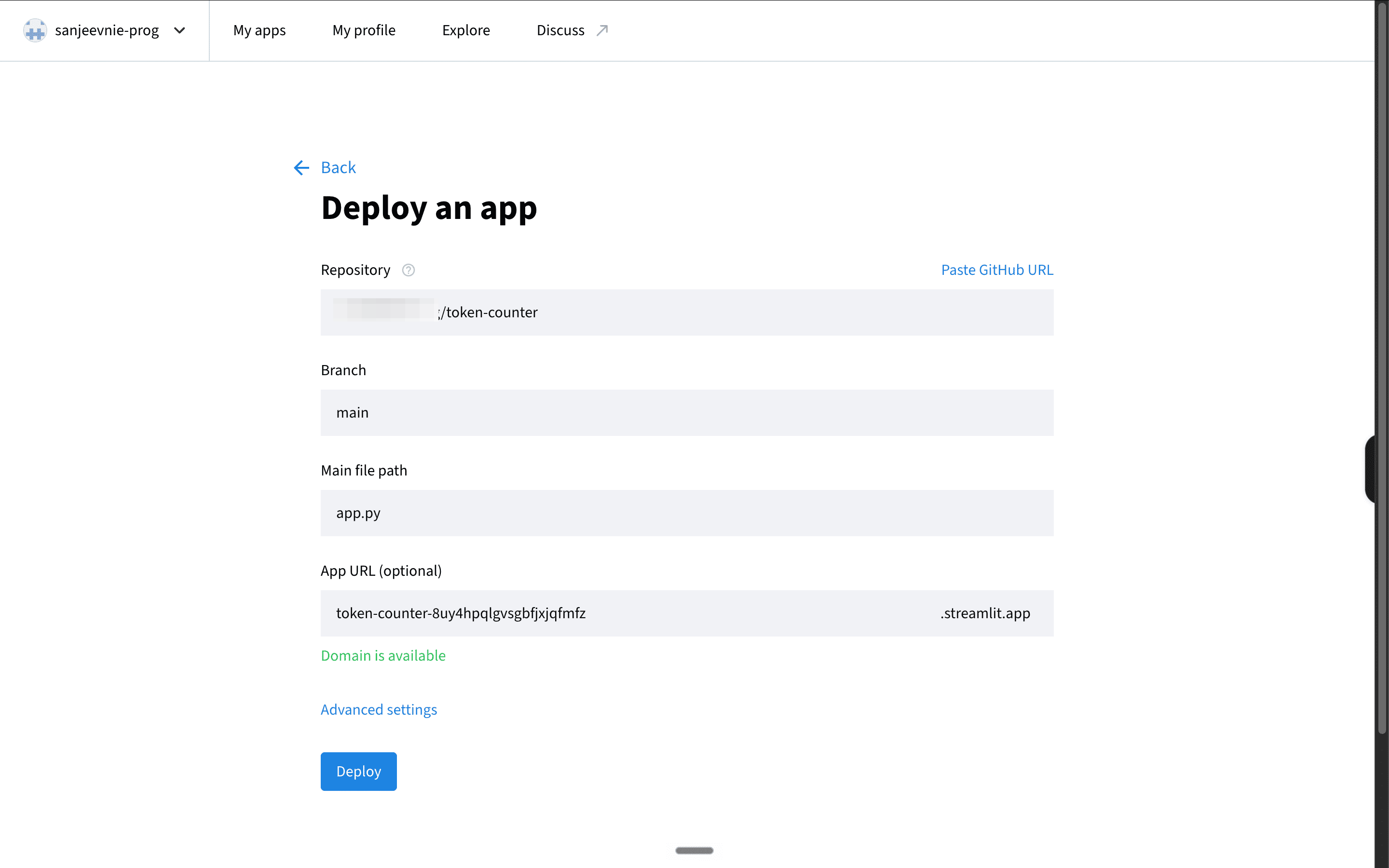
Fill in:
Branch: main
Main file path: app.py
Click Deploy. You’ll see a screen that says “Your app is in the oven.” Wait 60 seconds.
Step 6: Store your API key safely.
Your app is live. But it doesn’t know your Groq key yet. You’ll add it directly to Streamlit so it never has to live in your code.
1. In the bottom right of your app, click Manage app → Settings → Secrets.
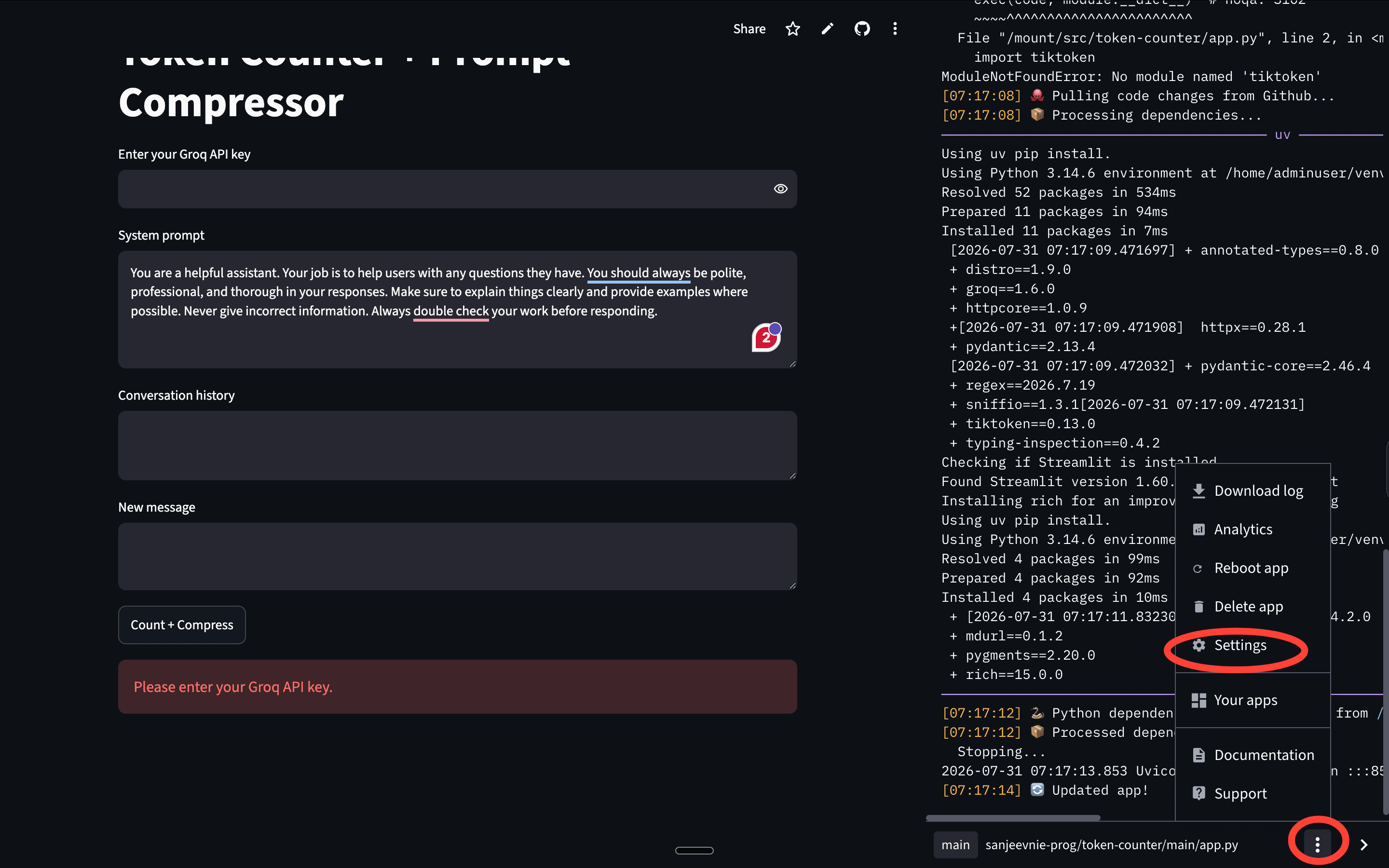
You should see a pop-up.
2. Head to Secrets, delete the contents and paste exactly this. (Replace your groq API key with your actual API key)
GROQ_API_KEY = “your-gsk-key-here”
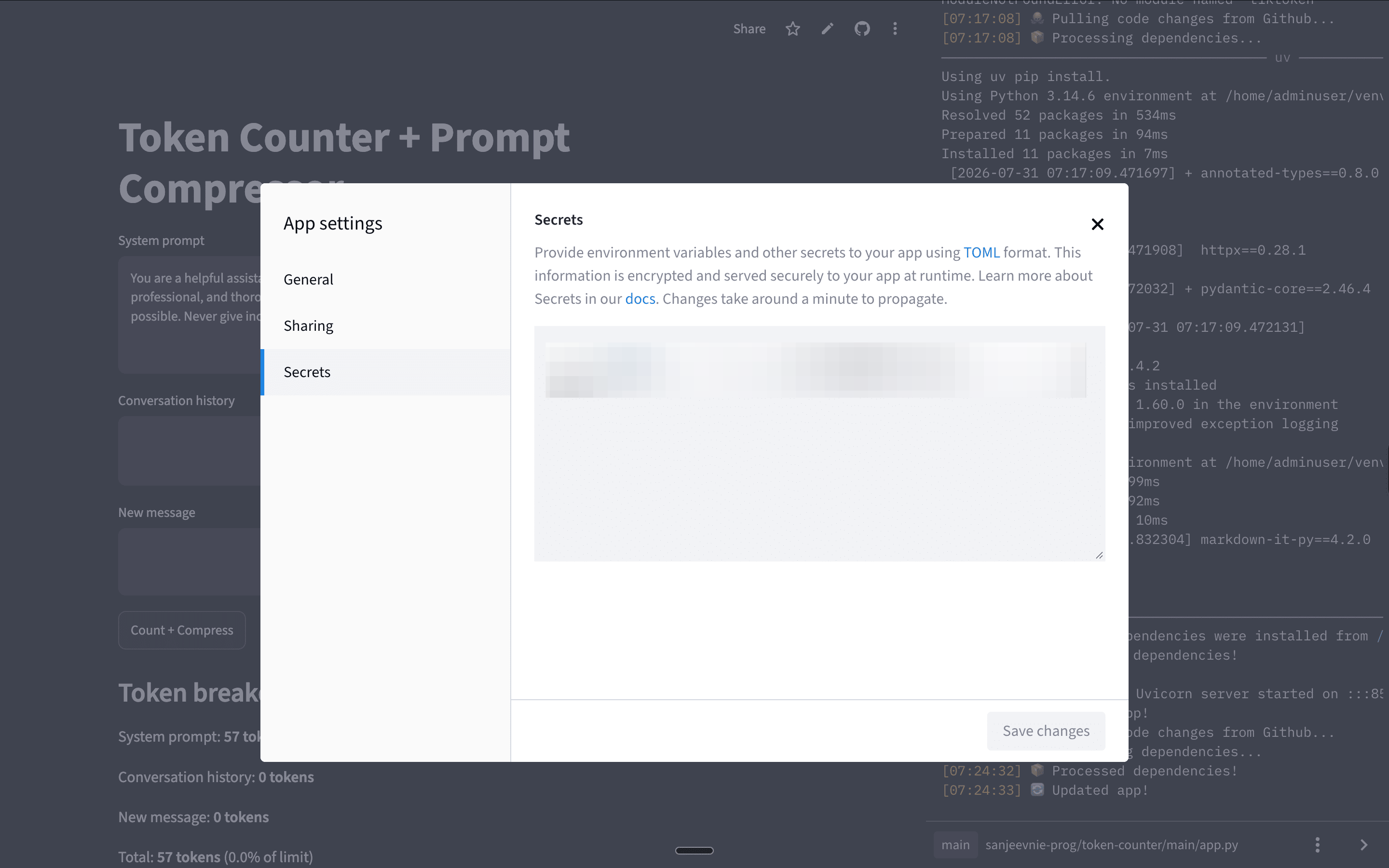
3. Hit Save.
4. Now go back to your GitHub repo. Open app.py and replace this line:
api_key = st.text_input(”Enter your Groq API key”, type=”password”)
With this:
api_key = st.secrets[”GROQ_API_KEY”]
5. Commit the change.
Streamlit detects it automatically and redeploys — takes about 30 seconds.
Step 7: Test it.
Paste this into the system prompt field — it’s a bloated example we used ourselves:
You are a helpful assistant. Your job is to help users with any questions they have. You should always be polite, professional, and thorough in your responses. Make sure to explain things clearly and provide examples where possible. Never give incorrect information. Always double-check your work before responding.
Leave conversation history and new message empty. Now hit the button. What do you see?
What’s next?
Streamlit, GitHub, and Groq are building blocks. Swap the compression logic for something else — a classifier, a formatter, a scorer — and you have a completely different tool. Same skeleton.
Try something. Break something. Tell us what you built.
Want to plug your brand into our newsletter?
Email us at collab@growthx.club

Getting this error in steamlit
[ UTC ] Logs for token-counter-xmdgb4m7ap8lxtfzkh8pov.streamlit.app/
────────────────────────────────────────────────────────────────────────────────────────
[12:14:39] 🚀 Starting up repository: 'token-counter', branch: 'main', main module: 'app.py'
[12:14:39] 🐙 Cloning repository...
[12:14:40] 🐙 Cloning into '/mount/src/token-counter'...
[12:14:40] 🐙 Cloned repository!
[12:14:40] 🐙 Pulling code changes from Github...
[12:14:40] 📦 Processing dependencies...
──────────────────────────────────────── uv ───────────────────────────────────────────
Using uv pip install.
Using Python 3.14.6 environment at /home/adminuser/venv
× No solution found when resolving dependencies:
╰─▶ Because tiltoken was not found in the package registry and you require
tiltoken, we can conclude that your requirements are unsatisfiable.
Checking if Streamlit is installed
Installing rich for an improved exception logging
Using uv pip install.
Using Python 3.14.6 environment at /home/adminuser/venv
Resolved 4 packages in 116ms
Prepared 4 packages in 141ms
Installed 4 packages in 19ms
+ markdown-it-py==4.2.0
+ mdurl==0.1.2
+ pygments[2026-07-31 12:14:42.413445] ==2.20.0
+ rich==15.0.0
────────────────────────────────────────────────────────────────────────────────────────
──────────────────────────────────────── pip ───────────────────────────────────────────
Using standard pip install.
Collecting streamlit (from -r /mount/src/token-counter/requirements.txt (line 1))
Downloading streamlit-1.60.0-py3-none-any.whl.metadata (10 kB)
ERROR: Ignored the following versions that require a different python version: 0.55.2 Requires-Python <3.5
ERROR: Could not find a version that satisfies the requirement tiltoken (from versions: none)
ERROR: No matching distribution found for tiltoken
[notice] A new release of pip is available: 24.0 -> 26.2
[notice] To update, run: pip install --upgrade pip
Checking if Streamlit is installed
Installing rich for an improved exception logging
Using standard pip install.
Collecting rich>=10.14.0
Downloading rich-15.0.0-py3-none-any.whl.metadata (18 kB)
Collecting markdown-it-py>=2.2.0 (from rich>=10.14.0)
Downloading markdown_it_py-4.2.0-py3-none-any.whl.metadata (7.4 kB)
Collecting pygments<3.0.0,>=2.13.0 (from rich>=10.14.0)
Downloading pygments-2.20.0-py3-none-any.whl.metadata (2.5 kB)
Collecting mdurl~=0.1 (from markdown-it-py>=2.2.0->rich>=10.14.0)
Downloading mdurl-0.1.2-py3-none-any.whl.metadata (1.6 kB)
Downloading rich-15.0.0-py3-none-any.whl (310 kB)
━━━━━━━━━━━━━━━━━━━━━━━━━━━━━━━━━━━━━━━━ 310.7/310.7 kB 17.5 MB/s eta 0:00:00[2026-07-31 12:14:46.547811]
Downloading markdown_it_py-4.2.0-py3-none-any.whl (91 kB)
━━━━━━━━━━━━━━━━━━━━━━━━━━━━━━━━━━━━━━━━ 91.7/91.7 kB 249.4 MB/s eta 0:00:00[2026-07-31 12:14:46.562539]
Downloading pygments-2.20.0-py3-none-any.whl (1.2 MB)
━━━━━━━━━━━━━━━━━━━━━━━━━━━━━━━━━━━━━━━━ 1.2/1.2 MB 85.8 MB/s eta 0:00:00[2026-07-31 12:14:46.590739]
Downloading mdurl-0.1.2-py3-none-any.whl (10.0 kB)
Installing collected packages: pygments, mdurl, markdown-it-py, rich
Attempting uninstall: pygments
Found existing installation: Pygments 2.20.0
Uninstalling Pygments-2.20.0:
Successfully uninstalled Pygments-2.20.0
Attempting uninstall: mdurl
Found existing installation: mdurl 0.1.2
Uninstalling mdurl-0.1.2:
Successfully uninstalled mdurl-0.1.2
Attempting uninstall: markdown-it-py
Found existing installation: markdown-it-py 4.2.0
Uninstalling markdown-it-py-4.2.0:
Successfully uninstalled markdown-it-py-4.2.0
Attempting uninstall: rich
Found existing installation: rich 15.0.0
Uninstalling rich-15.0.0:
Successfully uninstalled rich-15.0.0
Successfully installed markdown-it-py-4.2.0 mdurl-0.1.2 pygments-2.20.0 rich-15.0.0
[notice] A new release of pip is available: 24.0 -> 26.2
[notice] To update, run: pip install --upgrade pip
────────────────────────────────────────────────────────────────────────────────────────
[12:14:49] ❗️ installer returned a non-zero exit code
[12:14:49] ❗️ Error during processing dependencies! Please fix the error and push an update, or try restarting the app.