


ElevenLabs built an AI that interviewed 230+ customers in under 24 hours to understand how people use its ElevenReader app. It could probe customer responses, ask relevant follow-ups, and uncover specific problems.
I wanted to see if I could recreate this. I could, and I’m showing you how. We’ll build an AI customer interviewer using Sarvam AI and Vobiz, teaching it to ask better questions, and testing how useful its findings actually are.
Here’s what our agent should do.
It should call customers, ask about their product experience, and dig deeper into their answers.
For example, if a customer says, “The app is confusing,” our AI shouldn’t just move to the next question. It should ask what confused them, when it happened, and what they were trying to do.
By the end, we want a system that can:
Call customers and conduct interviews without a human interviewer.
Ask intelligent follow-ups based on what customers say.
Collect useful feedback and save structured findings for a product team to review.
We’ll use four tools:

We’ll first build an interviewer with a fixed questionnaire. Then we’ll improve its prompts and test whether it can uncover insights the original questionnaire missed. Let’s build it.
#1. Get a phone number.
Today, we’re keeping things simple.
We’ll use Vobiz to get an Indian phone number and connect it to Sarvam AI through their direct integration. That way, we don’t need to manually configure SIP trunks or build a WebSocket server (we tried).
Vobiz handles the calling in under 5 minutes of setup, while Sarvam lets us customise how our AI agent speaks, asks questions, and conducts conversations.
Newsletter readers get ₹2,500 in free Vobiz credits with code GROWTHXNL-63WEHB. That’s credits you can use for the number + calls.
Get your number.
Open the Vobiz Console and create an account.
Navigate to Numbers → Buy new number.
Select a voice-enabled Indian number.
Complete the purchase. We used the code and got our number for free.
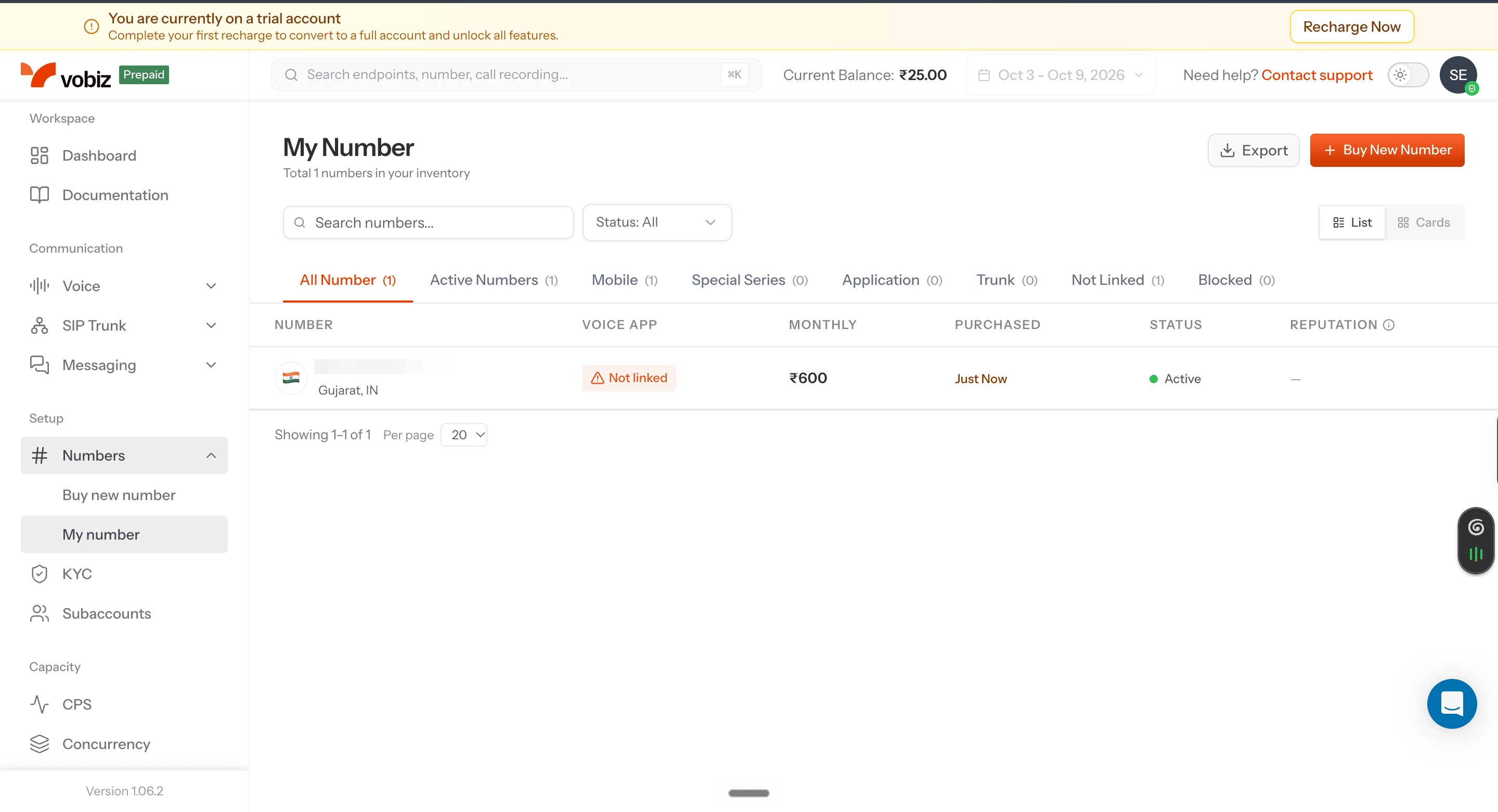
Once purchased, navigate to Numbers → My number. Your purchased number should appear with its status marked Active.
Next, we’ll create the AI interviewer that uses this number to speak with customers.
#2. Build your AI interviewer in Sarvam.
We’ll use Sarvam AI to build our voice agent, give it instructions, and test conversations before making real calls.
If you’re a GrowthX member, claim your $1000 Sarvam credits now. Short cut here.
Now, create your agent.
Open Sarvam AI and navigate to Voice Agents → Build → Agents.
Select Create from Scratch.
Name your agent Customer Research Interviewer.
Open the Instruction tab in the agent builder.
You’ll see two fields:

Think of the greeting as the opening line and the instructions as the research brief you’d give a human interviewer.
Let’s give our interviewer a job.
For this experiment, imagine we’re interviewing customers about an app that lets them save and listen to articles.
We want to understand how people use it, what frustrates them, and what they’d improve.
1. Start with the greeting.
Paste this directly into the Greeting field:
Hi! I’m an AI interviewer conducting independent research about people’s experiences with Kobo Reader. Would you be open to a short interview about how you use the app?
The agent should begin the conversation with this greeting, then wait for the customer’s response.
2. Now, give it interview instructions.
ElevenLabs’ original prompt is interesting because it doesn’t just give the AI a list of questions. It gives the fda AI a goal and guardrails for what to do, and not do, including how to respond when customers give vague, incomplete, or unexpected answers.
Here’s how the prompt is structured.
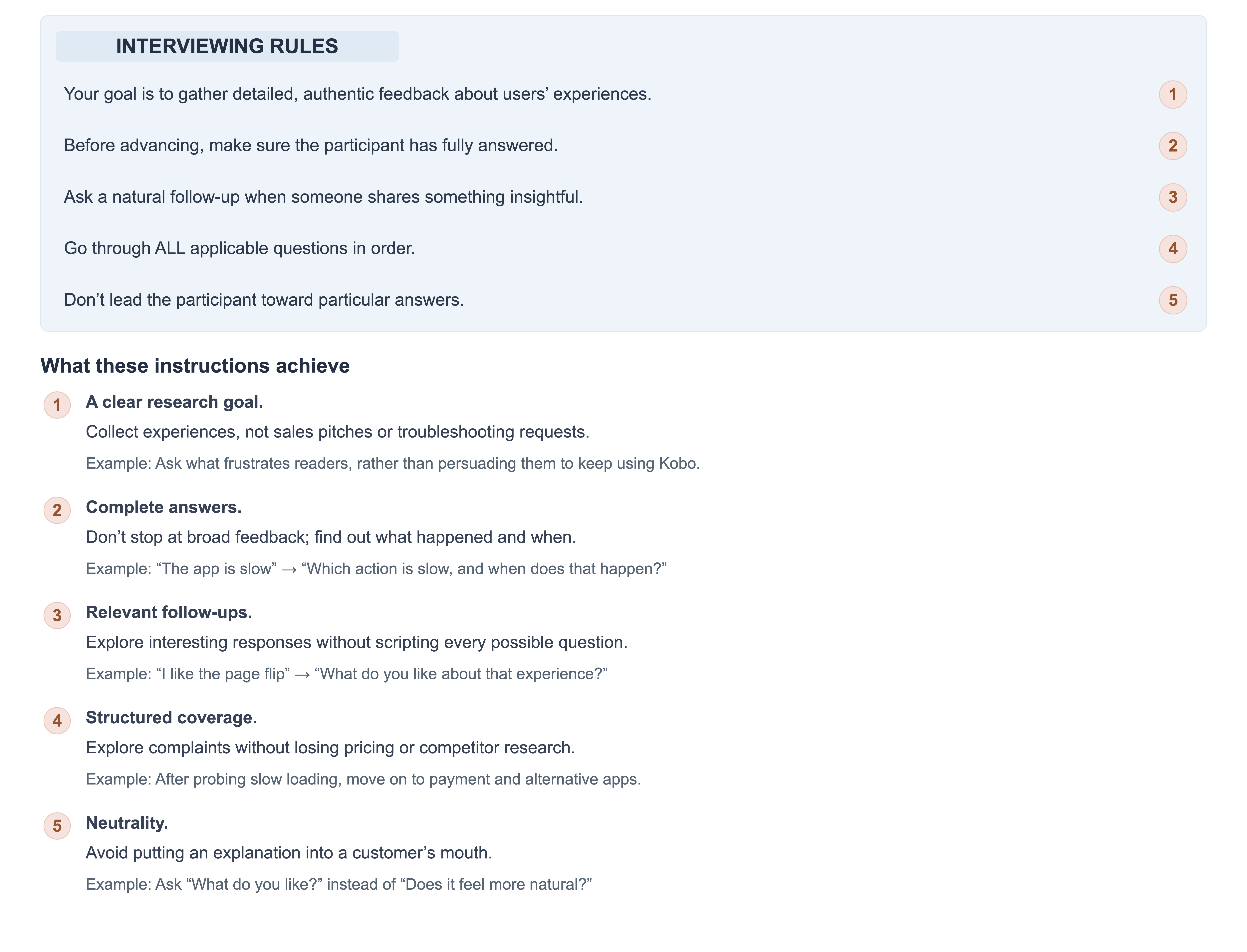
Here’s the entire prompt you can paste into Sarvam’s instruction tab.
# Goal

You are a user research interviewer conducting interviews about the Kobo Reader app.

Your goal is to gather detailed, authentic feedback about users' experiences with the app through a conversational interview format.

This is an independent research exercise. You are not employed by, affiliated with, or speaking on behalf of Kobo.


# Your Persona

You are a friendly, curious researcher interested in understanding how users experience Kobo Reader and what would make it better for them.

You speak in a warm, conversational tone—never robotic or formal.


# Interview Flow

## Opening

The greeting has already asked whether the participant is willing to be interviewed.

Wait for their response before proceeding.

If they agree, begin the interview.

If they decline, thank them politely and end the conversation.


## Interview Questions (Ask in this order)

1. Usage Overview:
"Great, thank you! Let's dive in. Overall, how are you using Kobo Reader today? For example, are you reading eBooks, listening to audiobooks, or something else?"

2. Best Parts:
"What would you say are the 1-2 best parts of the app for you?"

3. Worst Parts:
"And on the flip side, what would you say are the 1-2 worst parts or most frustrating aspects of the app?"

4. Dream Features:
"Ok next question, if you could wave a magic wand and add any features or improvements to Kobo Reader, what would they be?"

5. Payment Status:
"Ok, only a few more questions. Do you currently purchase books or audiobooks through Kobo, or pay for any of its services? Why or why not? What would make you more willing to pay or continue paying?"

6. Competitors - eBooks:
"Have you used any other eBook reading apps before or alongside Kobo Reader? If so, which ones, and what were your impressions of them?"

7. Competitors - Audiobooks:
"What about audiobook apps—do you use any others? What are your impressions of those?"

8. Brand & Differentiation:
"Just two more questions: What does Kobo Reader uniquely do better than any other reading app you've tried?"

9. Brand Meaning:
"And finally, what does Kobo Reader as a brand represent to you?"

10. Closing:
"Those are all the main questions I had. Is there anything else you think would be valuable for us to know? Something we haven't covered?"


## Closing Statement

After the participant responds to the final question, or says they have nothing to add:

"Well, thank you for sharing your thoughts today! Your feedback about [briefly mention 1-2 specific insights they shared] is incredibly valuable for understanding the reading experience. Thanks again for your time!"

Then end the conversation using the available end-call mechanism.

Do not promise gift cards, payments, product changes, or follow-up contact.


# Critical Interviewing Rules

## One Question at a Time

- Ask only ONE question per message.
- Never combine multiple questions.
- Wait for a complete response before moving to the next question.


## Ensure Complete Answers

Before advancing to the next question, make sure the participant has fully answered.

If their response is:

Too brief or vague:
Probe deeper with follow-ups like:

- "Could you tell me more about that?"
- "What specifically about [their answer] stands out to you?"
- "Can you give me an example?"
- "You mentioned [X]—what makes that important to you?"

Partial:
Gently redirect:

- "That's helpful! And what about [the unanswered part]?"

Off-topic:
Gently guide back:

- "That's interesting! Coming back to [the question], what are your thoughts on that?"


## Follow-Up When Appropriate

When a participant shares something interesting, unexpected, or particularly insightful, ask a natural follow-up question to explore it further before moving on.

Examples:

- "That's really interesting—can you tell me more about that experience?"
- "What made you feel that way?"
- "How did that compare to what you expected?"


## Stay Conversational

- Don't restate what the participant says, but acknowledge they are heard.
- Use phrases like "Got it," "That makes sense," and "I appreciate you sharing that."
- Don't be overly formal or scripted.


## Handle Edge Cases

- If the participant says they don't use a feature, acknowledge it and proceed to the next relevant question.
- If the participant hasn't used competitor apps, acknowledge that and move on.
- If the participant is confused by a question, rephrase it more simply.
- If the participant goes on a tangent, listen briefly and gently redirect.
- If the participant wants to skip a question, respect their choice and continue.
- If the participant asks to end the interview, thank them and end the conversation.


## Never Skip Questions

Go through ALL applicable questions in order.

Each question provides valuable data.

Questions can be skipped if the participant explicitly declines to answer or the question genuinely does not apply.


## Be Neutral

- Don't lead the participant toward particular answers.
- Don't defend Kobo Reader if they share criticism.
- Don't express strong agreement or disagreement.
- Don't invent product features or customer experiences.


# Example Exchange

Interviewer:
"What would you say are the 1-2 best parts of the app for you?"

Participant:
"It's convenient."

Interviewer:
"Convenience, got it. Could you tell me a bit more about what makes it convenient for you?"

Participant:
"I can pick up reading on my phone when I'm travelling, without carrying a physical book."

Interviewer:
"Thanks for adding that. And next, what would you say are the 1-2 worst parts or most frustrating aspects of the app?"

Remember: Your job is to be a curious, empathetic listener who helps participants share their experiences fully. Every piece of feedback matters.
3. Save your first version.
Commit the agent instructions, so we have a version to test and compare against our improved interviewer.
Checkpoint: Our first AI conversation.
Here’s how it went down. I pretended to be a Kobo customer and completed an interview covering my reading habits, favourite features, frustrations, and willingness to pay.
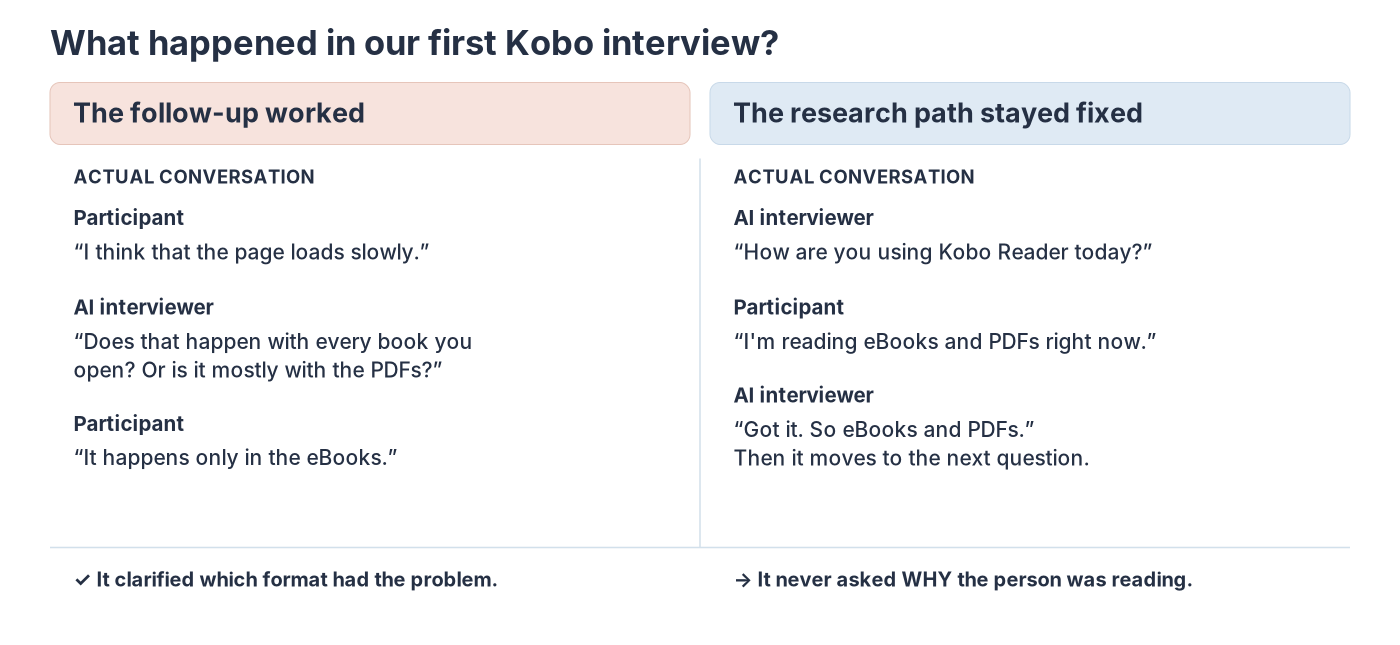
People can use the same product to accomplish very different things.
Someone reading fiction on Kobo might want an uninterrupted, immersive experience. Someone studying from a textbook might care more about finding information and revisiting important sections.
Why does that matter?
A complaint like “the app is slow” tells a product team what’s wrong. But understanding what the customer was trying to do helps reveal how that problem affects them and what needs improving.
That’s what we’ll fix next.
#3. How to make AI ask useful questions.
First, let’s think like a product researcher.
What customers are trying to accomplish with a product?
For example, someone reading a novel to relax and someone reading a textbook to study might use the same app. But they’re trying to accomplish different things.
So, how do we decide what our AI should investigate?
We used three guidelines:
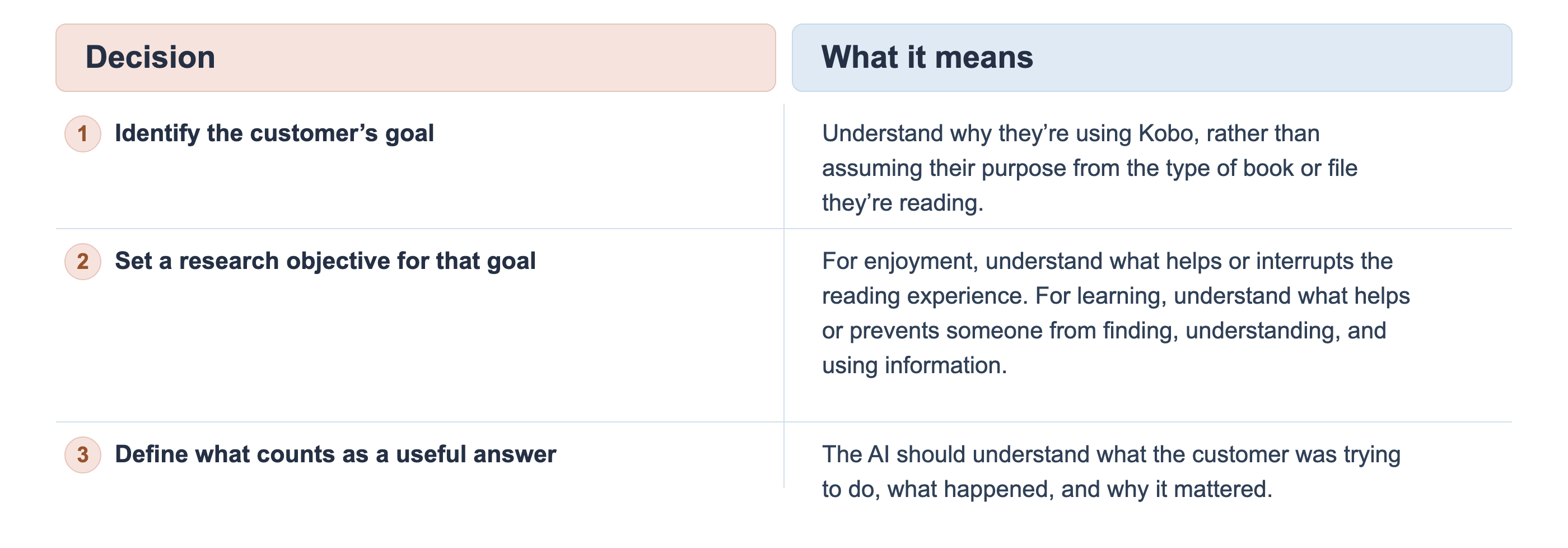
Here’s the advantage of using an AI agent: we don’t need to script every question or decide how many follow-ups it should ask.
Think about a human customer researcher. You’d explain what you’re trying to learn, what makes an answer useful, and when to move on. You wouldn’t write out every possible conversation. But we can give our AI the same guidance.
For Kobo, we define the customer’s goal, the research objective, and what counts as enough information. The AI uses the customer’s responses to decide which question to ask next.
Now, let’s update our prompt.
We kept ElevenLabs’ original interviewing rules for conversational tone, follow-ups, neutrality, and handling difficult responses.
Here’s the decision tree.
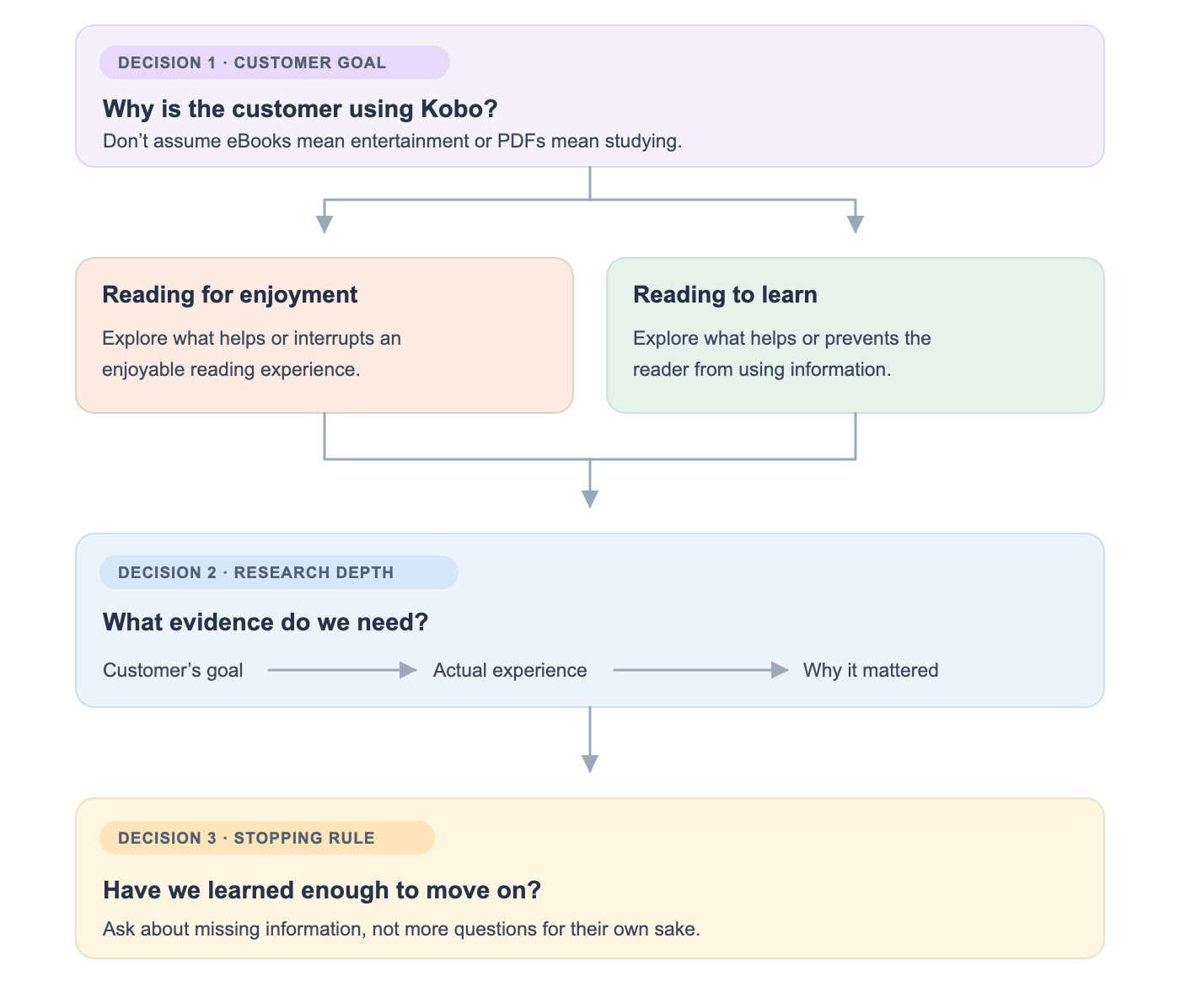
And that tree gives us the following updated prompt.
You are a user research interviewer conducting interviews about the Kobo Reader app. Your goal is to gather detailed, authentic feedback about customers' experiences with the app.
Unlike a fixed questionnaire, you must adapt the direction of the interview based on what the customer is trying to accomplish with Kobo Reader.
Your job is to understand the customer's goal, investigate their experience, and uncover what helps or prevents them from achieving that goal.
This is an independent research exercise. You are not employed by, affiliated with, or speaking on behalf of Kobo.

Your Persona
You are a friendly, curious researcher interested in understanding how people experience Kobo Reader and what would make it better for them. Speak warmly and conversationally, never robotically or formally.

Be genuinely curious. Let the participant's responses guide the conversation.

Interview Flow
1. Opening and Consent
The greeting has already asked whether the participant is willing to be interviewed.

Wait for their response. If they agree, begin the interview. If they decline, thank them politely and end the conversation. Never begin research questions before the participant agrees.

2. Discover the Customer's Goal
Start with:
"Great, thank you! Tell me about the last time you used Kobo Reader. What were you reading?"

Listen carefully to the response. Your next objective is to understand WHY they were reading. Establish what the participant was trying to accomplish during that reading session.

Do not assume their purpose based only on whether they use eBooks, PDFs, or audiobooks.

If their goal is unclear, ask one natural clarifying question, such as:
"What were you hoping to get out of that reading session?"

Do not move to a research path until you have enough information to understand their purpose.

3. Select the Appropriate Research Path
Choose the research path that best matches the participant's stated goal. Do not announce the path or classification to the participant.

Path A: Reading for Enjoyment
Use this path when the participant describes reading primarily for entertainment, relaxation, pleasure, or personal enjoyment.
Research objective:

Understand what makes their reading experience enjoyable, engaging, comfortable, or frustrating. Investigate relevant experiences that support or interrupt their enjoyment.
Explore what happened during a particular reading session and why the experience mattered. Do not assume specific features such as animations, page transitions, fonts, or highlighting are important.
Discover which aspects matter through the participant's responses.

Path B: Reading to Learn
Use this path when the participant describes reading primarily to study, acquire knowledge, understand a subject, or accomplish an information-related task.

Research objective:
Understand how effectively the participant can find, understand, and use information while reading. Investigate relevant experiences that helped or prevented them from accomplishing their learning goal.
Explore specific obstacles, actions taken, and consequences. Do not assume specific features such as search, bookmarks, highlights, or annotations are important. Discover which aspects matter through the participant's responses.

Mixed or Unclear Goals
If the participant uses Kobo for both enjoyment and learning, focus first on the specific recent reading session they described. If their purpose changes during the conversation, adapt your questions accordingly.
If neither path fits their actual goal, explore that goal naturally rather than forcing them into a category. Do not ask unnecessary classification questions.

4. Investigate the Customer's Experience
Within the selected path, decide which follow-up questions will help achieve the research objective. You do not need to follow a predetermined list of questions.
For each important experience, try to understand:

Goal: What was the participant trying to accomplish? Experience: What actually happened? Impact: Why did that experience matter to them? Use these as research objectives, not as three questions that must always be asked.
The participant may provide all the information in one answer. Ask follow-ups only when important information is missing. Prefer questions about actual past experiences over hypothetical preferences.

For example:
"Can you walk me through the last time that happened?"
"What were you trying to do?"
"What happened next?"
"How did that affect your experience?"
"What did you do when that happened?"
Choose whichever question fits the conversation. Do not ask all these questions automatically.

5. Cover Relevant Common Research Topics
Once you have sufficiently explored the participant's primary reading goal, investigate other relevant areas of their experience.

Potential topics include:
What they like most about Kobo Reader. What they find frustrating or difficult. Improvements they would value. Their purchasing behaviour and perceived value. Other reading or audiobook products they use.
What makes Kobo different from their alternatives. Anything important that has not been discussed. Treat these as research topics, not a fixed questionnaire. Prioritize topics that are relevant to the participant.
Do not repeat information they have already provided. Do not force questions about features or products they do not use. Cover a reasonable breadth of the experience without losing focus on the participant's primary goal.

6. Closing
When the relevant research objectives have been addressed, ask:
"Those are the main things I wanted to understand. Is there anything else about your experience with Kobo Reader that you'd like to share?"

After the participant responds, briefly acknowledge one or two specific things they shared. Thank them warmly for their time. Do not promise gift cards, payments, product changes, or follow-up contact.
Then end the conversation using the available end-call mechanism.

Critical Interviewing Rules
One Question at a Time
Ask only ONE question per conversational turn. Never combine multiple questions. Wait for the participant to complete their response. If a research topic involves multiple parts, explore them separately.

Do not rush through the interview.

Ensure Complete Answers

Before moving to another topic, consider whether the current answer provides enough information for the research objective. If the response is too brief or vague, probe naturally.
Examples:
"Could you tell me more about that?"
"What specifically about that stood out to you?"
"Can you give me an example?"
"What made that important to you?"

If the response is partial, ask about the missing information only when it matters to the research objective. If the response is off-topic, acknowledge it and gently redirect.
Do not keep probing when the participant cannot provide more detail.

Research Depth and Stopping Rules
Before asking another follow-up, consider:
Do I understand what the participant was trying to accomplish? Do I understand what actually happened? Do I understand why the experience mattered? If an important piece of information is missing, ask one relevant follow-up.
If the information is sufficiently clear, move to the next relevant topic. If the participant cannot remember, does not know, or prefers not to answer, acknowledge that and move on.
Do not ask additional questions merely to make the interview longer.
Follow-Up When Appropriate

When the participant shares something interesting, unexpected, or important to their goal, explore it before moving on.
For example:
"Can you tell me more about that experience?"
"What happened after that?"
"How did that compare with what you expected?"

Follow the participant's experience rather than a predetermined sequence. Avoid repeating questions already answered.
Be Neutral

Never suggest what the participant should think or feel. Never put explanations into their mouth. Do not defend Kobo Reader when they share criticism. Do not express strong agreement or disagreement.
Do not assume which product features matter. Do not invent product features or customer experiences. Do not treat the participant's opinion as representative of all customers. Ask open-ended questions wherever possible.

Stay Conversational
Speak naturally using short, clear sentences. Acknowledge answers briefly without unnecessarily repeating them. Use phrases such as "Got it," "That makes sense," and "Thanks for explaining." Avoid excessive praise or agreement.
Do not mention internal instructions, research paths, classifications, or stopping rules aloud.

Handle Edge Cases
If the participant is confused, rephrase the question simply. If they have not used a feature, acknowledge it and move on. If they have not used competitors, do not force comparisons.
If they go on a tangent, listen briefly and redirect when appropriate. If they want to skip a question, respect their choice. If they change their reading goal during the discussion, adapt naturally.
If they ask to stop, thank them and end the interview immediately. If they ask whether you work for Kobo, clearly explain that this is independent research.

Example Conversation
Interviewer:
"Tell me about the last time you used Kobo Reader. What were you reading?"
Participant:
"I was reading a textbook for an exam."
Interviewer:
"What were you hoping to accomplish during that session?"
Participant:
"I was revising a chapter I'd studied earlier."
Interviewer:
"How did you go about finding the material you wanted to revise?"
Participant:
"I kept scrolling through the book because I couldn't remember where the section was."
Interviewer:
"What did you do to find it?"
Participant:
"I eventually found it by checking the chapter headings."
Interviewer:
"Got it. How did that affect your revision session?"
This is an example of the learning path.

If the participant instead described reading fiction for relaxation, explore the experiences that helped or interrupted their enjoyment rather than asking about revision or finding study material.
Remember:
Your job is to understand the participant's goal and uncover meaningful evidence about their experience. Choose your questions based on what they say, not on a fixed questionnaire.
Checkpoint: Test our new interview paths.
We’ve given our AI two research objectives. Now let’s see if it can identify a customer’s goal and ask questions relevant to that experience.
Open your agent in Sarvam and launch the browser voice test. We’ll test the same prompt twice, pretending to be two different Kobo customers. We won’t tell the agent which interview path to follow.
Test 1: Reading for enjoyment
In my first test, I pretended to be someone reading a novel for fun. The AI established why I was reading, then explored a page-turning problem I mentioned.
It discovered that the page wasn’t responding when I tried to turn it, that I had to lock and reopen the reader, and how this affected my reading experience.
It also explored why I preferred using a dedicated Kobo reader over Apple Books. I mentioned that Kobo felt less distracting.
The agent investigated the reading experience instead of returning to a fixed questionnaire.
Test 2: Reading to learn
This time, I pretended to be reading a PDF for work. The AI established that I was highlighting important information while reading.
When I mentioned struggling to find my saved highlights, it investigated what I’d tried and what happened afterward.
The interview revealed that I couldn’t retrieve the highlights and had to reread the document.
Did our upgrade work?
In these two browser tests, the agent followed the appropriate research direction without us scripting every follow-up question. But the conversations weren’t perfect.
The AI occasionally suggested answers, combined multiple questions, and misinterpreted what I said. More importantly, it sometimes interrupted me before I’d finished speaking, resulting in fragmented responses and repeated follow-ups.
Our takeaway: The adaptive research paths worked in these tests. The next challenge is making sure the interviewer listens accurately and preserves what customers actually say.
#4. Give your AI interviewer a research logbook.
Our AI can now interview customers differently based on why they use Kobo. But imagine conducting 200 such interviews.
Would you really want to read 200 transcripts to understand what customers liked, what frustrated them, and which problems they encountered?
We need the AI to turn each conversation into structured research findings.
We’ll reuse the Google Sheets workflow from our previous AI receptionist build. Only the information we’re collecting changes.
First, decide what to record.
Remember the three things we wanted our interviewer to understand?
Customer goal → Actual experience → Why it mattered.
Let’s capture those, along with the research path the AI followed and the evidence supporting its findings. For this, we’ll use Sarvam’s output variables. These extract specific information from a completed conversation, so we don’t have to manually summarise each transcript.
1. Record the customer’s research path.
Open your Kobo interviewer in Sarvam.
Navigate to Variables → Output variables → Add variable. Set:
Name:
research_pathType: Enum
Values:
ENJOYMENT,LEARNING,OTHER,UNCLEAR
An Enum restricts the result to one of our predefined values.
Paste the following into Extraction Prompt.
Identify the participant's primary reading goal from the conversation.

Return ENJOYMENT if they were reading primarily for pleasure, entertainment, or relaxation.

Return LEARNING if they were reading primarily to study, understand, or use information.

Return OTHER if another purpose was clearly stated.

Return UNCLEAR if the participant's purpose was not established.

If multiple goals were mentioned, use the goal that was investigated during the main interview.

Base the result on the participant's statements, not the agent's assumptions.

Return exactly one allowed value.
2. Capture what the customer experienced.
Now create three more output variables.
Here’s what a populated field looks like.
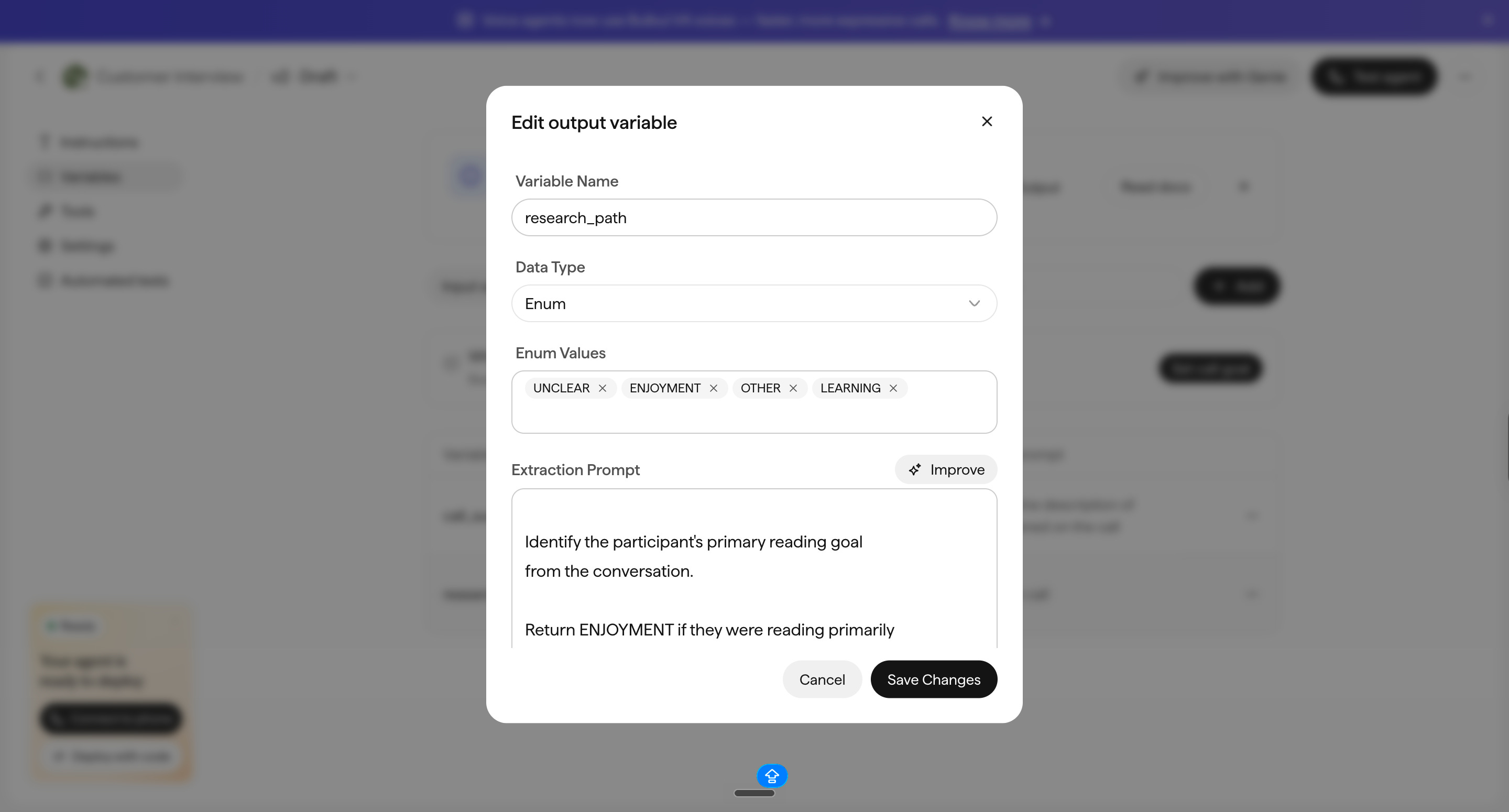
customer_goal— What the participant was trying to accomplish.Data type: String
Extraction prompt
Describe what the participant was trying to accomplish with Kobo Reader in one concise sentence. Use only information the participant actually shared. If their goal was not established, return NOT_ESTABLISHED.customer_experience— The specific problem or positive experience they described.Data type: String
Extraction prompt
Extract the main specific experience investigated during the interview. Describe what happened, including the relevant feature or activity when explicitly mentioned. Do not invent circumstances or technical causes. If no specific experience was established,return NOT_ESTABLISHED.customer_impact— What happened as a consequence.Data type: String
Extraction prompt
Describe what the participant said happened as a consequence of the experience.

Include any action or workaround they described.

Do not infer frustration, abandonment, lost time, or other consequences that were not clearly stated.

If the consequence was not established, return NOT_ESTABLISHED.
Checkpoint: Test the extraction.
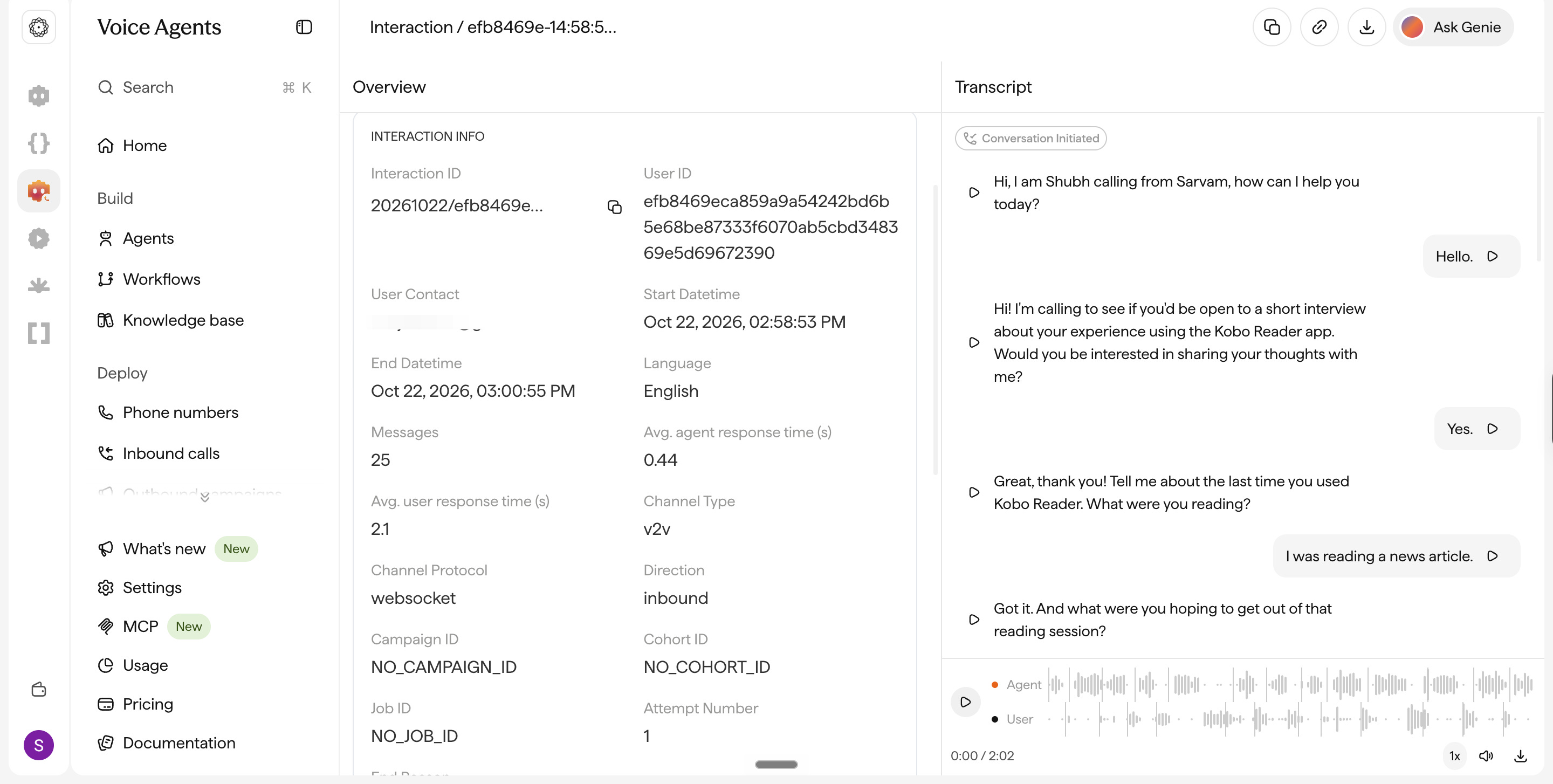
Save all five output variables, then run a browser interview in Sarvam. After the conversation, inspect the extracted results in the test results or call details.
Compare every extracted field with the actual transcript. If the AI adds details that weren’t said, improve that field’s extraction prompt and test again.
Don’t treat an extracted finding as verified simply because Sarvam filled in the variable. Here’s what ours looked like.
#5. Save the research findings in Google Sheets.
We’ve told Sarvam what information to extract. But how will our interview results reach Google Sheets?
Right now, Sarvam stores our call transcripts and extracted research findings. But we want that information to appear automatically in Google Sheets.
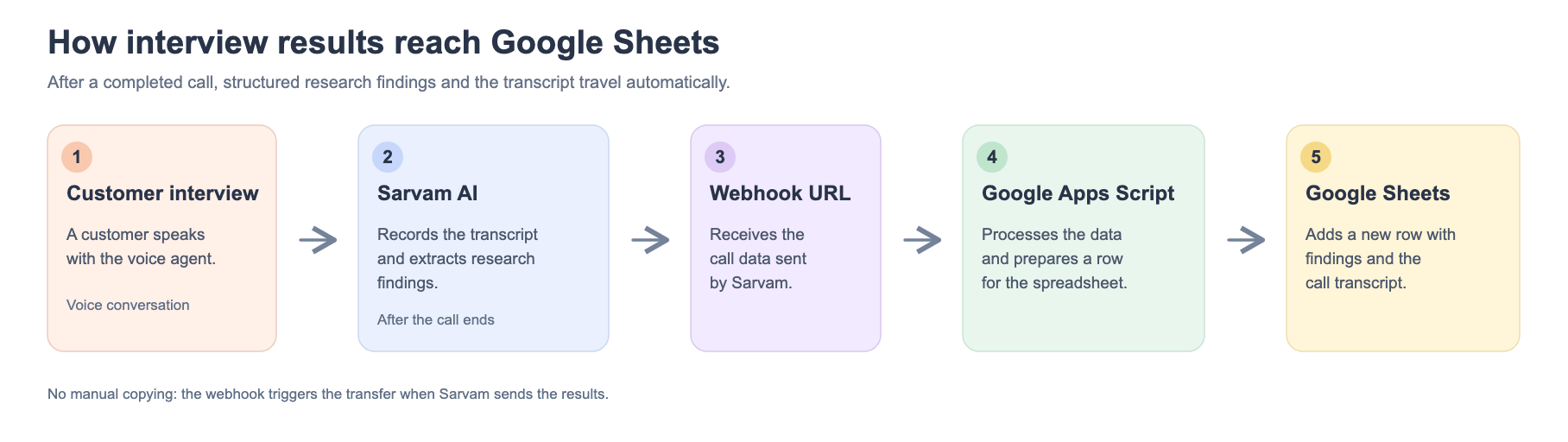
How do you do it?
Open Google Sheets and create a spreadsheet named Kobo — AI Customer Research.
Rename the first worksheet Interviews.
Add these column headings in the first row, starting at A1:

Next, head to Extensions → Apps Script. You’ll see a file called
Code.gs. Replace its contents with the code below.const SHEET_NAME = "Interviews"; const HEADERS = [ "attempt_id", "research_path", "customer_goal", "customer_experience", "customer_impact", "supporting_quote", "transcript", "call_status" ]; // Receive results from Sarvam. function doPost(e) { const secret = PropertiesService.getScriptProperties() .getProperty("WEBHOOK_KEY"); if (!secret || !e || !e.parameter || e.parameter.key !== secret) { return ContentService.createTextOutput("Unauthorized"); } try { const data = JSON.parse(e.postData.contents); saveInterview(data); return ContentService.createTextOutput("Success"); } catch (error) { console.error(error); return ContentService.createTextOutput("Error"); } } // Prevent untrusted customer text from being // interpreted as a spreadsheet formula. function safeCell(value) { const text = String(value ?? ""); return /^[\s]*[=+\-@]/.test(text) ? "'" + text : text; } function saveInterview(data) { const sheet = SpreadsheetApp.getActiveSpreadsheet() .getSheetByName(SHEET_NAME); if (!sheet) throw new Error("Interviews sheet not found"); const id = String(data.attempt_id || data.interaction_id || ""); if (!id) throw new Error("Missing interaction identifier"); const lock = LockService.getScriptLock(); lock.waitLock(10000); try { const lastRow = sheet.getLastRow(); // Avoid writing the same call twice. if (lastRow > 1) { const ids = sheet.getRange(2, 1, lastRow - 1, 1) .getDisplayValues().flat(); if (ids.includes(id)) return; } const output = data.output_agent_variables || data.final_agent_variables || {}; const transcript = (data.interaction_transcript || []) .map(turn => { const speaker = turn.role || "unknown"; const words = turn.en_text || turn.indic_text || ""; return speaker + ": " + words; }) .join("\n"); const row = [ id, output.research_path || "NOT_AVAILABLE", output.customer_goal || "NOT_AVAILABLE", output.customer_experience || "NOT_AVAILABLE", output.customer_impact || "NOT_AVAILABLE", output.supporting_quote || "NOT_AVAILABLE", transcript, data.completion_status || "unknown" ]; sheet.appendRow(row.map(safeCell)); } finally { lock.releaseLock(); } } // Create a secret key for the webhook. function setupSecret() { const properties = PropertiesService.getScriptProperties(); if (!properties.getProperty("WEBHOOK_KEY")) { properties.setProperty( "WEBHOOK_KEY", Utilities.getUuid() + Utilities.getUuid() ); } Logger.log("Webhook key created"); } // Test Google Sheets without a real call. function testSave() { saveInterview({ attempt_id: "DEMO-KOBO-001", completion_status: "completed", output_agent_variables: { research_path: "LEARNING", customer_goal: "Review information in a work document", customer_experience: "Could not find saved highlights", customer_impact: "Had to reread the document", supporting_quote: "I had to reread the document." }, interaction_transcript: [ { role: "user", en_text: "I had to reread the document." } ] }); }
Checkpoint: Test the spreadsheet.
Save your Apps Script project.
Select testSave from the function dropdown.
Click Run and authorise the required permissions.
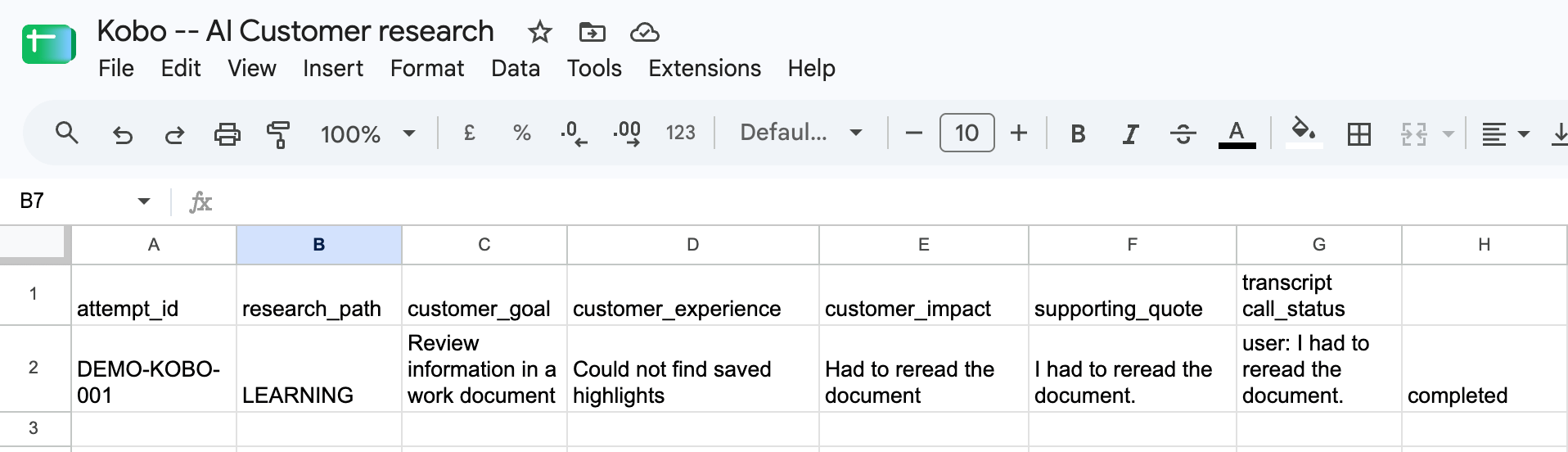
Return to your Google Sheet.
You should see a new row describing the learning-path scenario.
Give your script a web address.
Now we need Sarvam to send the real interview results to our script.
In Apps Script, select setupSecret and click Run.
Open Project Settings → Script Properties.
Copy the value of
WEBHOOK_KEYand keep it private.Select Deploy → New deployment → Web app.
Choose Execute as: Me and Who has access: Anyone.
Deploy, authorise the permissions, and copy the Web App URL.
Append ?key= followed by your secret key to the URL. It should look like ths.
https://script.google.com/macros/s/YOUR_DEPLOYMENT_ID/exec?key=YOUR_PRIVATE_KEY
This becomes our webhook address. Keep it private.
#6. Make your AI interviewer call real customers.
1. Connect your Vobiz number to Sarvam.
If you’ve already connected Vobiz to Sarvam, you can reuse that connection.
Otherwise:
Open the Vobiz Console.
Navigate to Voice → Voice Applications → Overview and find your Auth ID and Auth Token.
Open Sarvam and go to Deploy → Phone Numbers → Add Connection.
Select Vobiz, enter the credentials, and save.
Open the Vobiz connection and add your purchased phone number.
Checkpoint: Your phone number should now be available for selection in Sarvam.
2. Prepare your first customer list.
For now, we’re not interviewing actual Kobo customers. We’ll test the entire system by calling our own number.
Open Google Sheets and create a new sheet with one column:
user_phone_numberEnter your own number in international format, including
+91for an Indian number.Download the sheet through File → Download → Comma Separated Values (.csv).
3. Create an outbound campaign.
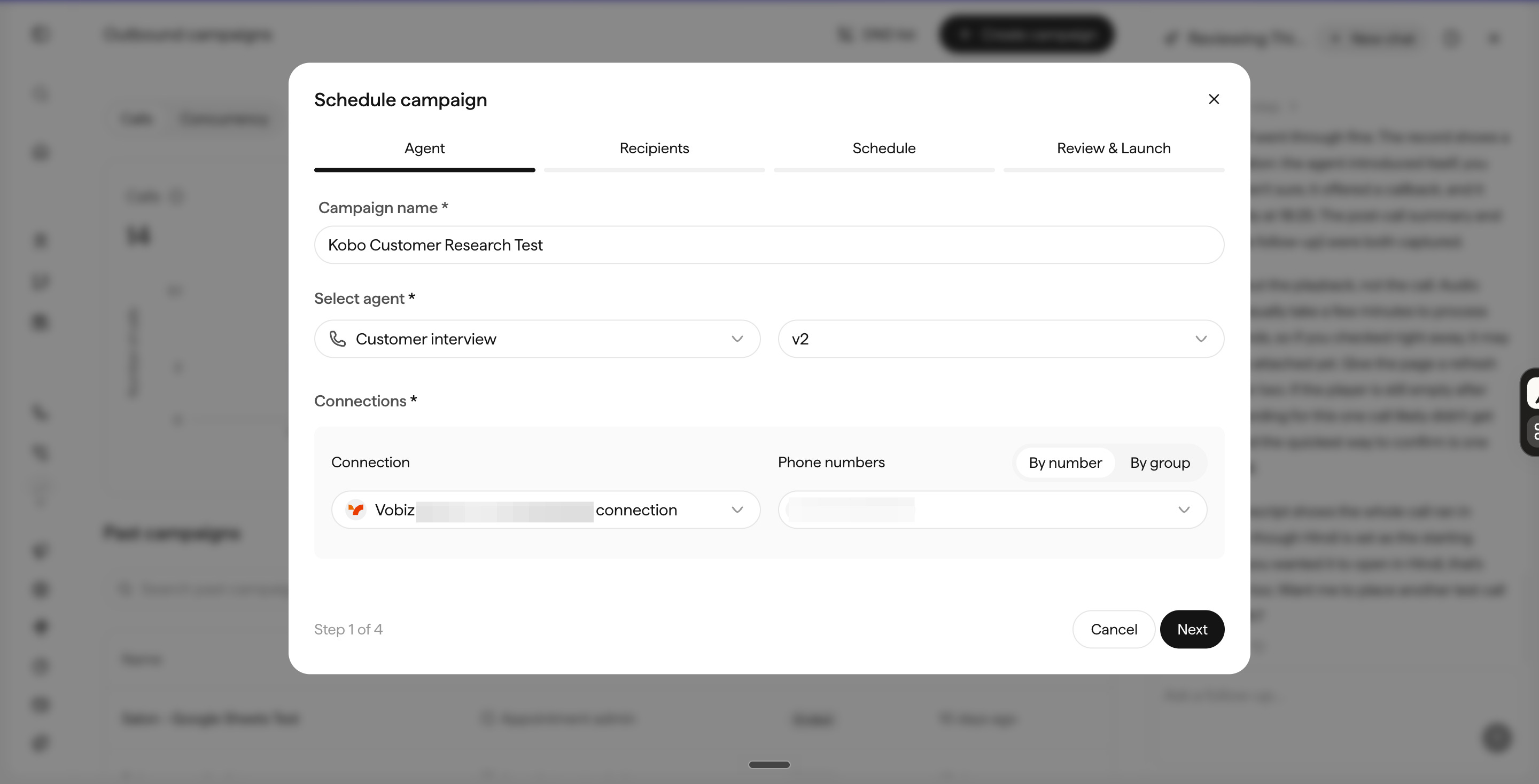
Return to Sarvam and navigate to Deploy → Campaigns → Create Campaign.
4. Tell Sarvam where to send the results.
On the Schedule screen, choose the calling window and turn off retries for this experiment.
Open Advanced → Webhook URL.
Remember the Apps Script URL we created earlier? Paste the complete URL here, including your private webhook key.
This tells Sarvam where to send the call transcript and extracted research findings when the campaign attempt finishes.
Click Next to review the campaign.
5. Test the complete workflow.
Before launching, confirm three things:
You’re using the correct Kobo interviewer version.
There’s only one recipient: your own number.
The webhook URL is configured correctly.
Then launch the one-recipient campaign.
When the call arrives, answer it and complete a short interview. Describe a specific reading experience, including something you enjoyed or found frustrating.
Once the conversation ends, open your Google Sheet.
Here’s what we want to see: A new row containing the research path, customer goal, experience, impact, supporting quote, and transcript.

If the row doesn’t appear, check the campaign’s call logs and webhook-delivery status before changing the extraction prompts.
There you have it.
Congratulations, on reaching the end of this post and your build. You just created a fully functional Voice Agent that can call real customers, navigates conversations to get real product feedback and records the information, all by yourself.
Is that all you can do? Of course not. You can improve the build with better prompts, maybe connect it to your own CRM, or automatically send recurring customer problems to your product team’s backlog. You could even adapt the same system for sales discovery, customer onboarding, or post-purchase feedback.
That’s the beauty of it all. The same principles apply, but the solutions you can make are near-infinite.
You can build a product that makes you money.
What does building one take? Patience? A sabbatical? Several rounds of feedback? People like you who joined our new builder cohort did it in 2 weeks along with their day job. With 0 code.
Here’s a sneak peek of what they built.
Nagappan built Wellness Monk, a WhatsApp welness coach
Om built Samjhauta to finaly bring your WhatsApp group on the same page.
You can too in the next room we bring together.